 Nileva

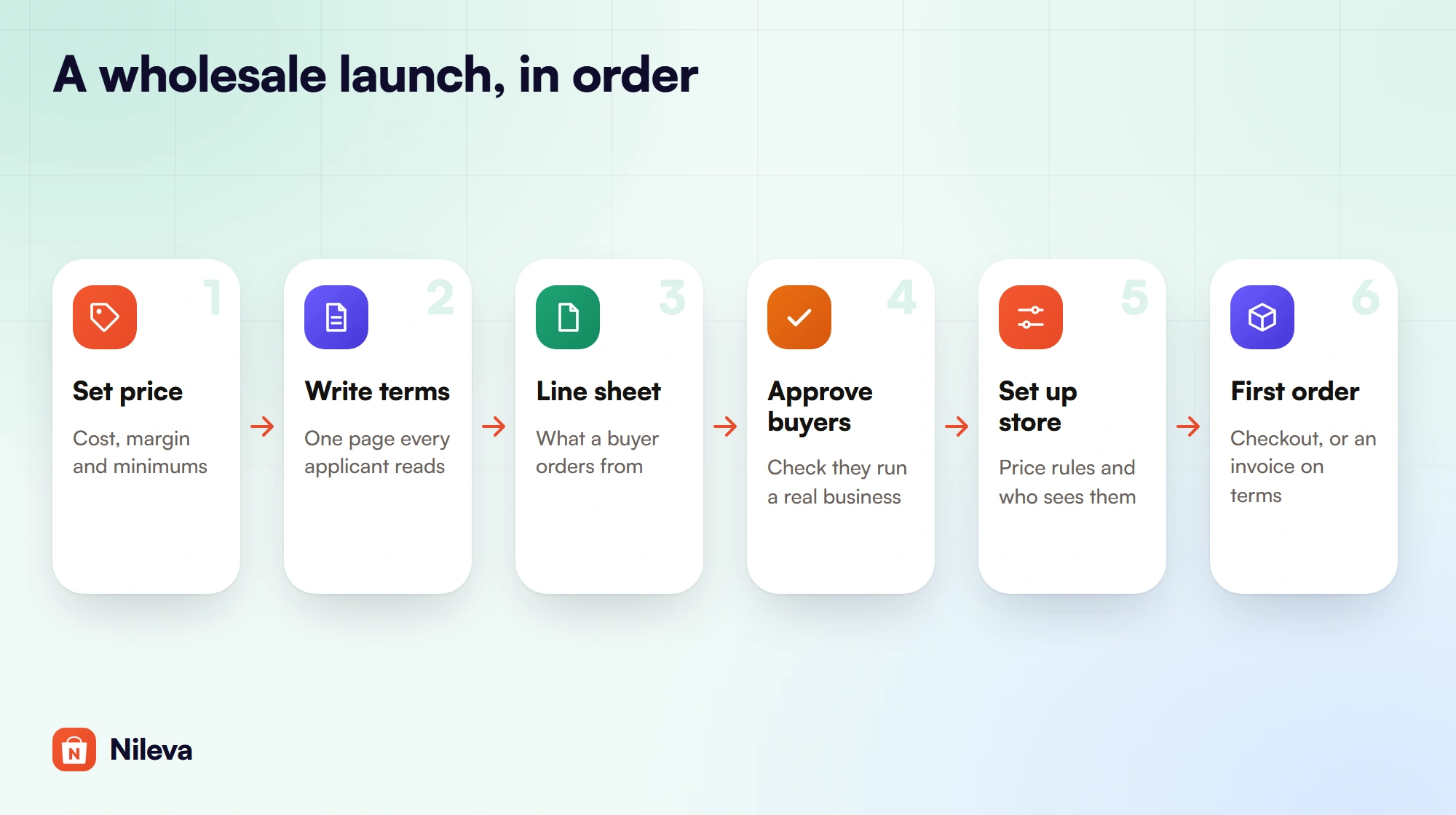
Shops have started asking to stock your products, and you want to say yes without building a second business from scratch. This guide shows how to sell wholesale on Shopify in seven steps, in the order the decisions depend on each other: price, terms, line sheet, who may buy, store setup, the first order and how to measure it. You get a worked first order with every number computed, a table of what goes on a wholesale line sheet, and a launch checklist that names the Shopify setting or app screen for each step and the plan it needs.
Key takeaways
- Decide your wholesale price and your terms before you touch the store. Every setting later follows from them.
- Shopify's own B2B tools have been part of the Basic, Grow and Advanced plans since April 2, 2026, not only Plus.
- Approve buyers before they get trade prices, and decide whether guests should see prices at all.
- Put minimums and payment terms on your line sheet, then enforce what Shopify or an app can enforce. A minimum across the whole first order is the part you will check by hand.
- Start with a few stockists and track wholesale sales apart from retail from the first order.
Is wholesale right for your Shopify store?
Wholesale changes four things at once. You earn less per unit, because the stockist needs room to make their own margin. Orders get bigger, so one buyer can take a case of every product. Payment often comes later, because shops expect to pay on terms once they trust you. And good stockists reorder, so one approved buyer can be worth many retail orders over a year.
That trade only works if your cost leaves room for two margins, yours and the shop's, and if you can carry the stock and wait for the money. Work through Step 1 with your real costs before you reply to the first enquiry. If the numbers don't leave two healthy margins, it is better to know now than after you have printed a price list.
Step 1: Set your wholesale price and minimums
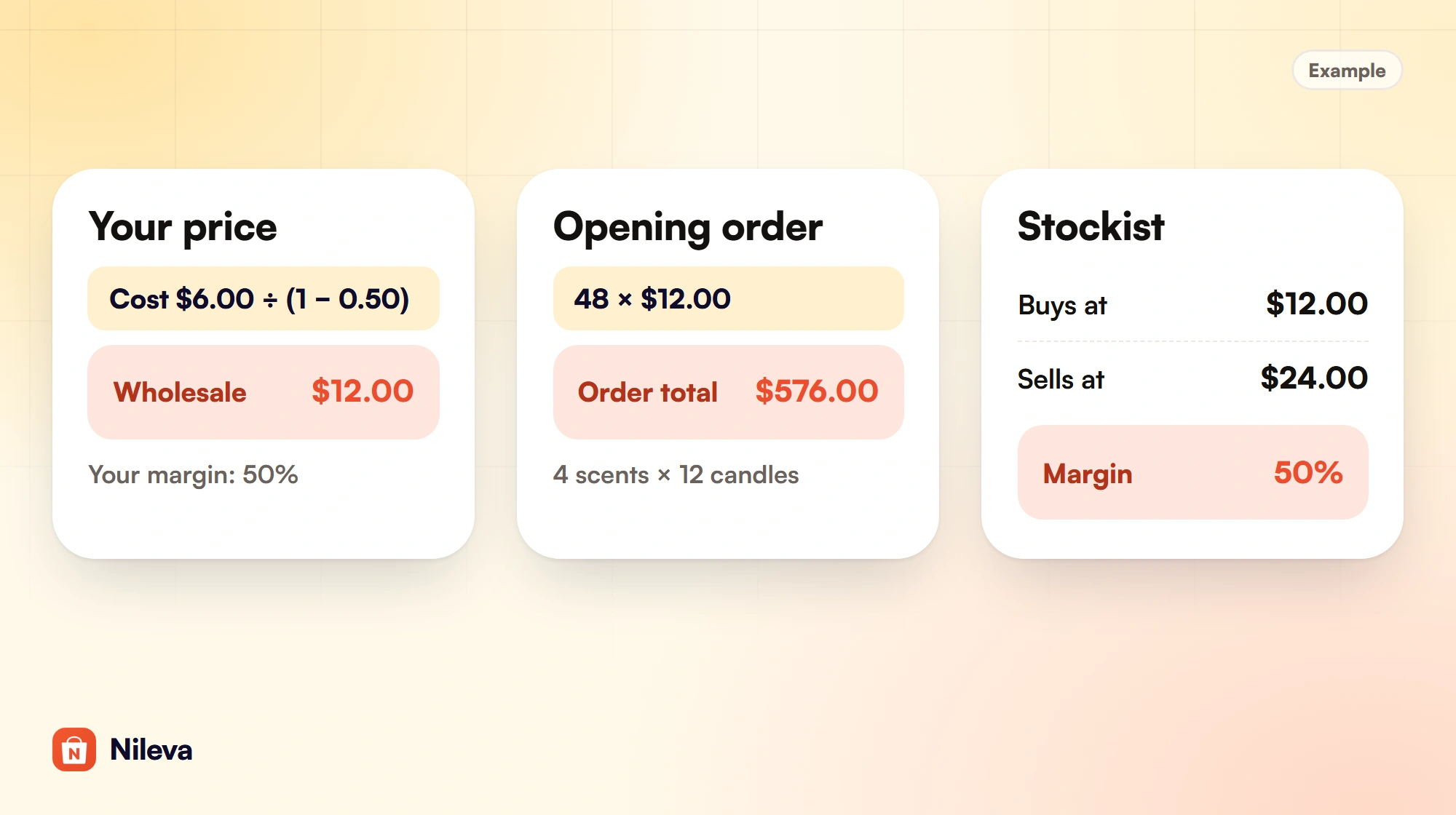
A common starting point is keystone pricing: the suggested retail price is twice the wholesale price, which gives the stockist a 50% margin. You then check that the wholesale price still leaves you the margin you need. Margin here is the share of the selling price you keep, calculated the way Shopify does on a product's cost per item: (price − cost) ÷ price.
Example: a candle brand with a landed cost of $6.00 per candle that wants a 50% margin on wholesale sales.
| Line (example) | Computation | Result |
|---|---|---|
| Landed cost per candle | given | $6.00 |
| Wholesale price at a 50% margin | $6.00 ÷ (1 − 0.50) | $12.00 |
| Suggested retail price (keystone: wholesale × 2) | $12.00 × 2 | $24.00 |
| Your margin on a retail sale at $24.00 | ($24.00 − $6.00) ÷ $24.00 | 75% |
| A stockist's opening order: 4 scents × 12 | 48 × $12.00 | $576.00 |
| The stockist's margin if they sell at $24.00 | ($24.00 − $12.00) ÷ $24.00 | 50% |
Note the fourth row. If you enter $6.00 as the cost per item in Shopify, the margin the product page shows is the retail margin on $24.00, which is 75%. On a wholesale sale you keep 50%, so plan with the lower figure.
In Shopify, $24.00 stays the product's price, and the wholesale price is set on top of it: a 50% Percent off rule or a Fixed price of $12.00 gives the same result here. Our complete guide to Shopify wholesale pricing shows how to enter it and how the two types behave differently later, and our guide to work out your wholesale price covers margin, markup and tiers in full.
Decide your minimums in the same sitting, because they belong to the price. A case pack (12 of each scent in the example) protects your packing time, and an opening-order minimum makes sure a new account is worth the setup.
Step 2: Write your wholesale terms
Your terms are a one-page document every applicant reads before ordering. Keep them short and specific. Example terms for the candle brand:
- Opening order: $300 minimum. Reorders: $150 minimum.
- Case pack: 12 candles per scent.
- Payment: the first order is paid when it is placed; after two paid orders, approved accounts can pay on net 30.
- Shipping: charged at cost and added to the invoice.
- Returns: broken items replaced if reported within 7 days of delivery; unsold stock is not taken back.
Payment terms don't need Plus. Shopify's B2B payment terms include net 7, 15, 30, 45, 60 or 90 days, due on fulfillment, and a fixed date for a single draft order (Shopify Help Center: payment terms), and its B2B plan table lists net terms on Basic, Grow, Advanced and Plus. Our guide to net 30 terms covers who should get which term and how to collect.
Step 3: Build a wholesale line sheet
A line sheet is the document a buyer orders from: one row or tile per product, with the trade price beside it. It travels by email and gets printed, so it must work without your website. The app does not make line sheets, and you don't need special software for one: a spreadsheet or a design tool is enough. What matters is the content.
| Field | Why the buyer needs it | Where it lives in Shopify |
|---|---|---|
| Product photo and name | To pick products without opening your site | Product media and title |
| SKU | To order fast and paste into a quick order form | Variant SKU |
| Wholesale price and suggested retail price | To see their margin | A wholesale rule (app) or a B2B catalog; retail in the product's price field |
| Case pack or minimum per product | To order in the units you ship | Native quantity rules, or the app's per-line minimums |
| Opening and reorder minimums | To plan the first order | Your terms only: no setting enforces a whole-cart minimum in the app |
| Payment terms | To know when to pay | Draft order payment terms |
| How to order | To place the order | Your store link, the registration page and the quick order page |
Copy the SKUs from Shopify rather than typing new ones. A buyer who orders through the app's Quick Order form can paste lines of SKU, quantity from a spreadsheet, and the form looks for an exact SKU match first, so a line sheet with the same codes turns straight into an order.
Keep the line sheet and the store in step
Every price on the sheet must match what the buyer pays at checkout. If you raise a retail price, a Percent off rule follows it, so the wholesale price moves too and the sheet is out of date. A Fixed price rule stays put, so the store and the sheet agree, but the stockist's margin on the new retail price changes. Either way, date your line sheet and send a new one whenever a price changes.
Finding your first wholesale buyers
Start with the enquiries you already have: reply with your terms, your line sheet and the link to apply. Then make a short list of independent shops that already sell products next to yours, and send each one the same three things with a sample if you can afford it. Put a "Wholesale" link in your store's footer so buyers who find you can apply without emailing first. Trade shows and wholesale marketplaces are other routes; their costs and rules change, so read their current terms before you commit.
Step 4: Decide who can buy wholesale
Nobody should get trade prices before you have checked that they run a real business. Shopify has a native route: company account requests. A buyer fills in a form built with the Shopify Forms app, which creates a company, a location and a customer in your admin. The company cannot order or see B2B pricing until you approve it, and a Shopify Flow template can approve requests automatically (Shopify Help Center: company account requests). The form can't be used on a store that is closed to everyone except B2B customers.
The app's registration form is the other route, and it is on every plan, including Free. A submission is marked Pending and you are emailed. You approve it, optionally into a customer group whose tag is then applied, and the approval email goes out; or you reject it with an email that carries a secure link to edit and resubmit (B2B registration overview). Buyers can register as an individual or as a company, and on the Advanced plan you can add your own fields, such as a file upload for a resale certificate. In the app it lives under Customers → B2B Registration (the docs call the page Registration). The whole setup is in our guide to a registration form with approval.
Then decide what everyone else sees. In a store that also sells retail, an untagged shopper already sees the retail price, because a wholesale rule targeted at a tag or group only applies to those buyers. If you don't want guests to see prices at all, the app's Catalog Visibility (Advanced) replaces the price with a blurred mask and an "Unlock wholesale price" button for anyone outside your audience. No B2B price is shown to a gated shopper; treat it as a sign-in gate, not a secret. Our guide to how to hide prices until login explains what it covers and what it does not.
Step 5: Set up wholesale on your Shopify store
The first choice is the store itself: wholesale beside retail in the store you have, or a separate store for trade. Shopify supports both ("You can use one store for both B2B and direct-to-consumer (D2C) sales, or create a separate B2B-only store", Shopify Help Center: B2B). We compare the two in one store or two.
The second choice is where wholesale prices come from: Shopify's native B2B catalogs, or a rule in a wholesale app. Our pricing guide has the full comparison; the short version is below.
What native Shopify B2B gives you on Basic, Grow and Advanced
Shopify's B2B features by plan lists these on Basic, Grow, Advanced and Plus: companies and company locations, quantity rules (minimum, maximum and increment), quantity price breaks, net terms, draft order to invoice, a quick order list and the Trade theme. Below Plus you get 3 active catalog assignments to B2B markets; direct company catalogs, deposits and partial payments stay on Plus. Shopify's changelog dates this move to non-Plus plans to April 2, 2026.
One limit matters for wholesale minimums. Native quantity rules and price breaks apply to each variant on its own: "Customers can't combine 5 gray hats and 5 blue hats to meet the minimum of 10 hats" (Shopify Help Center: quantity rules and price breaks). Our guide to B2B on Shopify without Plus shows what each Shopify plan includes for B2B.
What a wholesale app adds
Nileva B2B Wholesale Pricing works on customers and tags you already have, with no company setup needed. Here is what it adds to a launch, with the plan for each:
- Wholesale pricing rules (Free: 1 rule). Percent off, Amount off or Fixed price. On Free a rule can target all customers, logged-in customers or guests; targeting a customer tag or group, which a wholesale launch needs, starts on Essential ($10 a month).
- The buyer's price on the storefront (any plan). The B2B Prices app embed (named Nileva B2B Wholesale in the theme editor) shows the price on product pages and on collection and search cards, and the app's Shopify discount function charges it at checkout with no discount code.
- Registration with approval (Free; custom fields on Advanced).
- Quantity tiers (Free: 1 volume rule) with a "Volume Pricing Table" block on the product page. Tiers count units of one variant; on Advanced they can also count all variants of a product together, or several products together.
- Per-line minimums that block checkout (Advanced).
- Quick Order by SKU search or paste (Essential, 1 form).
- Catalog Visibility to mask prices from guests (Advanced).
- Submit Order for Approval, which turns a cart into a draft order you confirm and invoice with terms (see the plans on the app page).
For the case pack in the example, a volume rule targeted at your wholesale tag with a first tier of 12 units, counted per variant, and Block checkout below the first tier switched on stops a checkout with fewer than 12 of any scent. If you don't want a discount at 12, make that tier 0% off; the minimum order guide shows the trick. Our minimum order quantity guide covers every counting option.
The app has no spend minimum across the whole cart, such as "$300 for a first order": a minimum order value counts each cart line on its own, and a minimum quantity counts only the products in its rule. Put the opening minimum in your terms and on the line sheet, and check it yourself before you confirm the order.
Step 6: Take and invoice the first order
Back to the example. The stockist applies, you approve them into your wholesale group, and they order 12 of each of 4 scents: 48 candles at $12.00, so $576.00, which clears the $300 opening minimum in the example terms. How the money comes in depends on the path you offer.
Checkout at the wholesale price. The buyer signs in, sees $12.00 on each candle and pays at checkout like any customer. This suits the first order in the example terms, which is paid when placed.
Submit for approval, then invoice on terms. With the app's Draft Orders turned on, an approved buyer sees Submit Order for Approval instead of the Checkout button, and no payment is taken. The order lands in Orders → Draft Orders as Pending. You add the shipping cost, pick the term (Due on receipt or one of Shopify's net terms, such as net 30), and click Confirm & send payment link; the app creates a Shopify draft order and Shopify emails one invoice. Example: $576.00 plus $30.00 shipping makes an invoice of $606.00. You confirm the order as submitted, so if a request falls short of your opening minimum, cancel it and ask the buyer to resubmit. Our guide to B2B draft orders covers this flow step by step.
A quote first. A buyer who wants a custom price for a large order can use Request a Quote (Advanced); when they accept your offer, the app creates a Shopify draft order. Our guide to request a quote covers the back-and-forth.
Step 7: Measure the wholesale channel
You need wholesale sales apart from retail from day one, or you won't know whether the channel pays. The app's Analytics page, under Orders → Analytics, is on every plan including Free. It shows B2B net sales, B2B orders, average order value and buying customers for a date range, who is buying by customer, customer group or company, and a table of what your B2B pricing cost you per customer group (Analytics overview).
The app tags each B2B order nileva-b2b when it is placed, and older orders carry orb2b-b2b. To list all of them in Shopify, search Orders for tag:nileva-b2b OR tag:orb2b-b2b. Analytics leaves out orders placed before you installed the app, which were never tagged, and test orders. Our guide to Shopify B2B reports compares this page with Shopify's own reports.
How to sell wholesale on Shopify: the launch checklist
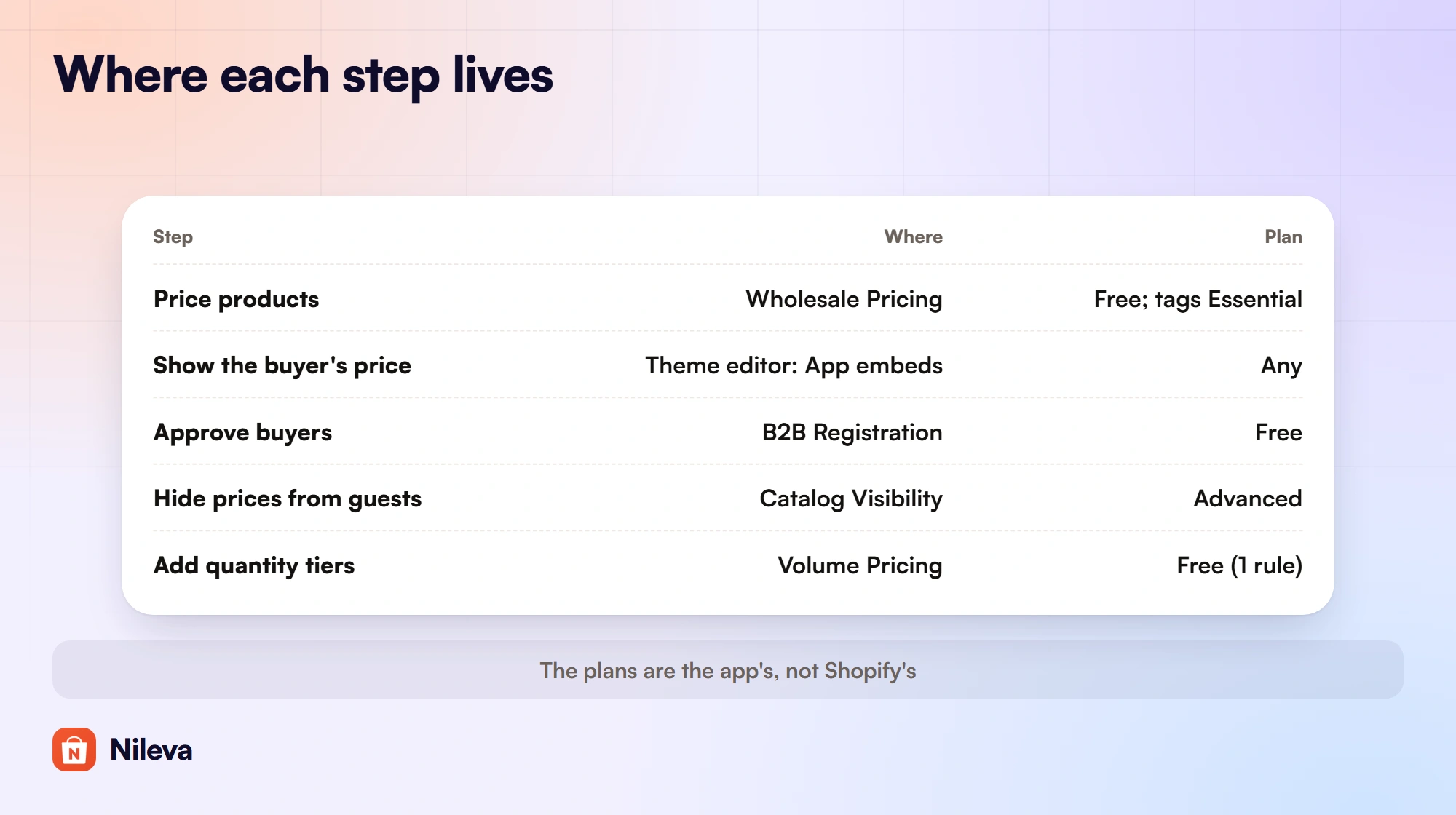
Work down this list once your price, terms and line sheet are ready. The app screens are the app's admin menu; the plans are the app's, not Shopify's.
| Step | Where | Plan |
|---|---|---|
| Price every product for wholesale | Wholesale Pricing → Create wholesale pricing (app), or a B2B catalog (Shopify) | App: Free for all or logged-in customers; tag or group targeting Essential |
| Show the buyer's price before checkout | Theme editor → App embeds → Nileva B2B Wholesale | Any |
| Take applications and approve buyers | Customers → B2B Registration | Free (custom fields Advanced) |
| Hide prices from guests | Pricing → Catalog Visibility | Advanced |
| Add quantity tiers | Volume Pricing → Create volume pricing, plus the "Volume Pricing Table" block | Free (1 rule) |
| Block checkout below a per-line minimum | Volume rule → "Block checkout below the first tier" | Advanced |
| Let buyers order on account with terms | Orders → Draft Orders | See the plans on the app page |
| Report B2B sales | Orders → Analytics | Every plan |
Before you send the first invitation, test the whole path with a test customer: apply, approve into your group, sign in, check the price on a product page and a collection card, and place an order. The app's quick start walks through the first rules and the storefront check. For quantity discounts beyond a case pack, see our guide to quantity breaks, and for buyers who order by SKU, the quick order form.
Frequently asked questions
Can I sell wholesale on Shopify without Plus?
Yes. Shopify B2B runs on Basic, Grow, Advanced and Plus, with net terms, quantity rules and price breaks on all four. Wholesale apps from the Shopify App Store that use Functions also run on any plan.
Do I need a separate store for wholesale?
No. Shopify lets you sell B2B and direct-to-consumer from one store or run a separate B2B-only store. You can start in the store you already have and show wholesale prices only to approved buyers.
How do I stop retail customers from seeing wholesale prices?
Target your wholesale rules at a customer tag or group; shoppers without it see the retail price. To hide prices from guests entirely, the app's Catalog Visibility (Advanced) masks them for anyone outside your audience.
Can I require a minimum first order?
Per line, yes: on the Advanced plan a volume rule can block checkout below its first tier. A minimum across the whole cart is not available in the app today, so state it in your terms and check each order before you confirm it.
What should a wholesale line sheet include?
A photo and name, the SKU, the wholesale and suggested retail prices, the case pack, your opening and reorder minimums, payment terms and how to order. Use the same SKUs as your Shopify variants so buyers can paste them into a quick order form.
Try it
Set up wholesale prices, approvals and tiers in the store you already have, free to start.


