 Nileva

Shopify quantity breaks lower the unit price as a buyer orders more: 3 units at one price, 10 at a lower one, 50 at a lower one still. This guide covers what Shopify's built-in price breaks do and where they stop, how to run tiers for any buyer with an app, how the counting method changes who reaches a tier, and a worked tier table that shows where buyers will round their order up.
Key takeaways
- Shopify B2B has quantity price breaks on Basic, Grow, Advanced and Plus: up to 10 per product, applied to each variant, inside B2B catalogs.
- An app rule can give tiers to any shopper: everyone, signed-in customers, guests, or (from the Essential plan) a customer tag or group.
- The counting method decides who reaches a tier: the same variant only, every variant of a product, or every unit in the cart.
- Show the tiers on the product page, or buyers find the discount only in the cart.
- When a buyer also has a wholesale price, decide whether the two discounts compete (Best price) or combine (Stack): it changes what your tiers are worth to trade buyers.
Quantity breaks, tiered pricing and volume discounts
Three terms describe the same idea, and pages use them loosely, so here is how this guide uses them.
A quantity break (Shopify calls it a price break) is one threshold: "10 or more units, $18.00 each". Tiered pricing is the whole ladder of breaks for a product, from the first one to the open-ended top. A volume discount is the discount a buyer earns by reaching a tier; Shopify's help pages call the feature volume pricing.
One more distinction matters for B2B. A retail volume discount is usually open to every shopper, often as a bundle offer. A wholesale tier is often meant only for approved trade buyers, or it sits on top of a trade price they already have. Keep that in mind when you choose a tool: some only reach company accounts, others reach any shopper you can identify.
Shopify's native quantity price breaks
Shopify has quantity price breaks built in. According to Shopify's B2B features by plan, quantity rules (minimum, maximum and increment) and quantity price breaks are available on Basic, Grow, Advanced and Plus, so you don't need Plus for them.
The rules of the native feature are on Shopify's page on quantity rules and volume pricing:
- You can add up to 10 price breaks per product, and they are applied to each variant.
- "Customers need to meet the required quantity for each variant to qualify for the price break." Five gray hats and five blue hats don't add up to a break at 10.
- A break quantity must be greater than the product's minimum order quantity and a multiple of its increment.
- Once a product has volume pricing, its price in that catalog becomes fixed, and an overall percentage adjustment on the catalog no longer applies to it.
Price breaks live in catalogs, set up under Markets → Catalogs or by CSV import. A catalog reaches the company locations of a B2B market; on Plus it can also be assigned directly to company locations (Shopify Help Center: catalogs). In short, native breaks are for buyers you have set up as B2B companies.
Native Shopify quantity breaks are enough if your trade buyers are companies in Shopify B2B and each variant is ordered in its own volume. It is not enough if you want tiers for buyers known only by a tag, tiers that count sizes or colors together, tiers based on order value, or the same ladder for retail shoppers.
Shopify quantity breaks for wholesale and retail buyers
Nileva B2B Wholesale Pricing handles quantity breaks with volume pricing rules, separate from its wholesale price rules. In the app, go to Volume Pricing, create a rule, pick the type (Quantity or Amount), add your tiers and save. Each tier has a from and to value (leave the top tier's maximum blank for "and above"), and its own discount type: Percent off, Amount off each unit, or Fixed Price for each unit.
A rule also has customer and product eligibility, optional active dates, and a status. The discount is applied at checkout by the app's discount function, with no discount code.
Quantity tiers
Quantity tiers count units. The docs' example ladder is 3–9 units at 5% off, 10–49 at 10% off and 50 or more at 15% off: a buyer who orders 12 units gets 10% off, and a buyer who orders 2 gets nothing (quantity tiers).
Who gets the tiers depends on the rule's customer eligibility. On every plan, including Free, a rule can apply to all customers, logged-in customers only, or guests only. From the Essential plan you can target customer tags and customer groups, which is how you give a trade tier to wholesale buyers only. Product eligibility works the same way: all products or specific products on Free, plus specific collections and product tags from Essential.
Order-value tiers
Amount tiers count money instead of units, and they need the Essential plan. The docs' example: $200–499 at 5% off, $500–999 at 10% off, $1,000 and above at 15% off (amount tiers).
The trap is what "order value" means. The app's minimum order guide says it plainly: amount tiers are measured on each cart line on its own, not on the whole cart, and the checkout function works that way.
Example: a $25.00 product. A buyer who orders 26 units of one variant has one line worth $650.00, which reaches the 10% tier and costs $585.00. A buyer who orders 13 units in each of two colors has two lines of $325.00. Each line only reaches the 5% tier, so each costs $308.75, and the order costs $617.50. Same spend, $32.50 more. If your buyers usually mix variants, quantity tiers with Mix variants reward them more predictably.
How units are counted
For quantity tiers, the rule's discount method decides which units add up. Same variant counts each variant on its own, which is how Shopify's native breaks work too. Mix variants adds up all variants of one product, and Mix products adds up every unit in the cart. The two mixed methods need the Advanced plan.
Mix products needs a closer look on a rule limited to some products. The checkout function counts every product in the cart toward the tier, including products the rule doesn't cover, and then discounts only the products the rule covers. Example: a rule on sauces with a tier at 10 units. A buyer who orders 3 sauces and 10 packs of napkins has 13 units counted, so the 3 sauces get the 10+ price.
The docs use one cart to show the difference: 3 shirts in size M and 4 in size L of the same shirt, against a tier that starts at 5 units.
| Method | Units counted | Reaches the 5+ tier? |
|---|---|---|
| Shopify native price breaks | Each variant must reach the break on its own: M = 3, L = 4 | No |
| App: Same variant | M = 3, L = 4, counted apart | No |
| App: Mix variants (Advanced) | 3 + 4 = 7 units of the same product | Yes |
| App: Mix products (Advanced) | Every unit in the cart counts together: 7 | Yes |
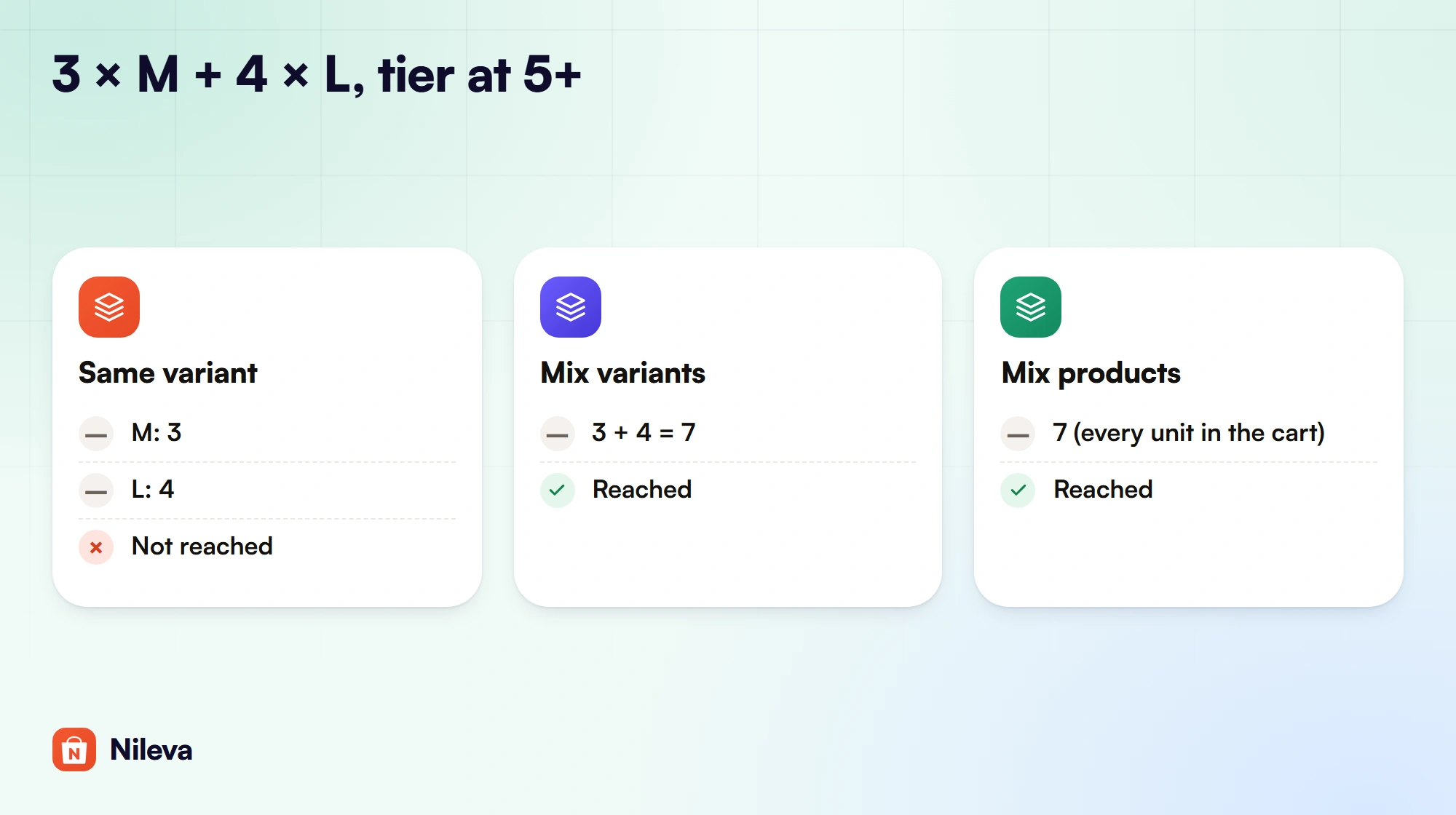
Choose Same variant when the price really depends on volume per item, for example a print run per design. Choose Mix variants for apparel and anything sold in sizes or colors, where a buyer thinks "20 shirts", not "4 per size". Choose Mix products for a range a buyer orders as one assortment, such as a line of sauces or refills, and accept that anything else in the same cart counts too.
A tier table that buyers understand
Here are the docs' tiers on a $20.00 product, worked out in full. The last column is the one most tier tables forget: what the order costs one unit below each break.
| Tier | Quantity | Discount | Unit price | Order at the tier's minimum | One unit below the tier |
|---|---|---|---|---|---|
| — | 1–2 | none | $20.00 | 1 × $20.00 = $20.00 | — |
| 1 | 3–9 | 5% off | $19.00 | 3 × $19.00 = $57.00 | 2 × $20.00 = $40.00 |
| 2 | 10–49 | 10% off | $18.00 | 10 × $18.00 = $180.00 | 9 × $19.00 = $171.00 |
| 3 | 50+ | 15% off | $17.00 | 50 × $17.00 = $850.00 | 49 × $18.00 = $882.00 |
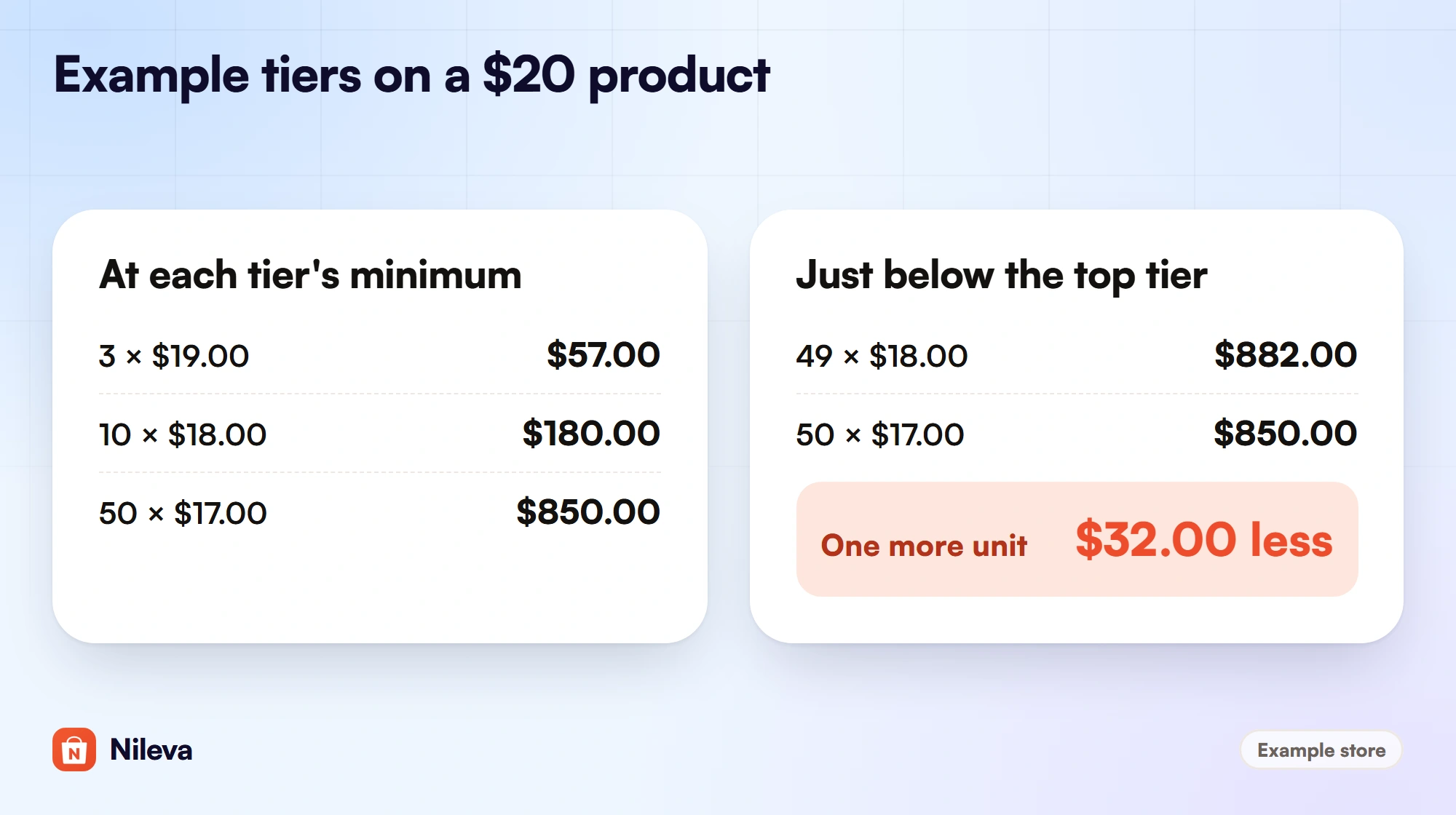
Look at the last row. 49 units cost $882.00 and 50 units cost $850.00, so one more unit saves the buyer $32.00. From 48 units (48 × $18.00 = $864.00) the 50-unit order is already cheaper; at 47 units ($846.00) it isn't. A buyer who notices will round up, and you sell more units for less money. That is fine if you planned it. If not, narrow the jump between the top two discounts.
Four rules keep a tier table clean:
- Don't let tiers overlap. The docs say tiers must not overlap, and the editor doesn't stop you: where two tiers match, the checkout uses the one that comes first in the rule's list, which may not be the better one.
- Don't leave gaps. If one tier ends at 15 and the next starts at 18, an order of 16 or 17 units matches no tier and gets no discount at all.
- Leave the top tier open. A blank maximum means "and above", so the best price keeps applying however many units are ordered.
- Use Fixed price with care. A Fixed price tier sets the unit price, so the discount is the gap between the product's price and your number. If the product's price changes later, the gap changes with it.
Before you open a rule, check that it fits your plan. The Free plan includes 1 volume rule, Essential 3, Advanced 20 and Platinum unlimited (the full list is on the app page).
| What you want | Plan |
|---|---|
| One quantity ladder for everyone, signed-in buyers or guests | Free (1 volume rule) |
| Tiers for a customer tag or group; order-value tiers; scheduled rules | Essential ($10/month, 3 rules) |
| Mix variants or Mix products; blocking checkout below tier 1; Compact + Popup table | Advanced ($30/month, 20 rules) |
| Unlimited volume rules | Platinum ($80/month) |
Showing quantity breaks on the product page
A tier a buyer can't see doesn't change what they order. The app shows the ladder in a Volume Pricing Table block on the product page (storefront table):
- In the rule, keep Show discount table on product page switched on (it is on by default).
- In Shopify, open Online Store → Themes → Customize and the Product template.
- Click Add block inside the product section, pick Volume Pricing Table under Apps, and save.
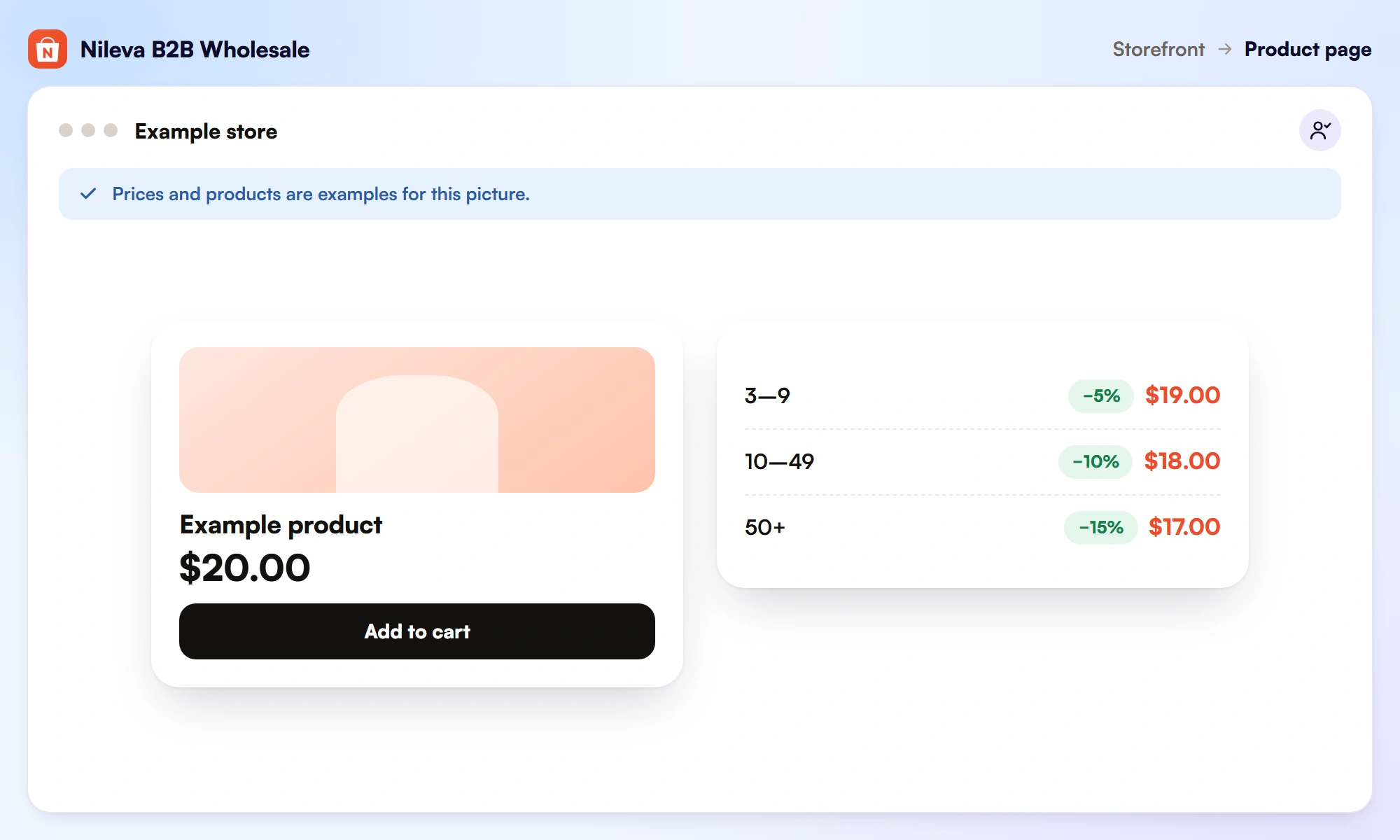
The table works out each tier's price from the selected variant's price and updates as soon as the buyer switches variant. With the app's B2B Prices embed switched on, the price on the product page also follows the quantity box, so it shows the tier price for the quantity the buyer has typed.
You pick the table's look in the rule. Basic Grid and Detailed Grid are available on every plan, more templates come with Essential, and Alibaba Style and Compact + Popup (a one-line teaser that opens a popup with quantity, unit price and saving per unit) need Advanced. Colors, alignment and font sizes are set in the rule and in the block settings. If the table doesn't appear, check three things: the block is on the product template, the table switch is on in the rule, and the rule matches this customer and product.
Buyers who order by SKU from a quick order form get the same tiers: the form shows a price preview, and the volume tiers apply in the cart and at checkout.
Wholesale price plus a quantity break
Many B2B stores already give trade buyers a lower price, for example a tier for tagged buyers as in our guide to customer-specific pricing. When that buyer also reaches a volume tier, the Discount combination setting under Settings → General decides what happens:
- Best price for customer (the default): the app works out the price under each rule and charges the lower one.
- Stack wholesale + volume: the wholesale discount applies first, then the volume discount on the reduced price.
The docs' example is a $100.00 product with a 20% wholesale rule and a 15% volume tier: Best price charges $80.00, and Stack charges $100.00 × 0.80 × 0.85 = $68.00, about 32% off (discount strategy).
Now add a trade price to the tier table above. Example: the $20.00 product, the same three tiers for all customers, and a 10% wholesale rule for a Gold tag.
| Quantity | Retail shopper (tiers only) | Gold buyer, Best price | Gold buyer, Stack |
|---|---|---|---|
| 1–2 | $20.00 | $18.00 | $18.00 |
| 3–9 | $19.00 | $18.00 (wholesale wins) | $18.00 × 0.95 = $17.10 |
| 10–49 | $18.00 | $18.00 (equal) | $18.00 × 0.90 = $16.20 |
| 50+ | $17.00 | $17.00 (volume wins) | $18.00 × 0.85 = $15.30 |
Under Best price, the Gold buyer gains nothing from your tiers until 50 units, because their 10% already beats or equals the first two tiers. Under Stack, every tier is worth something to them, and at 50 units they pay $15.30, 23.5% below retail. Pick the setting that matches what you want trade buyers to do, and run your margins at the top tier before you choose Stack.
Turning the first tier into a minimum order
On the Advanced plan, a volume rule can also block checkout until the buyer reaches its first tier. The switch is Block checkout below the first tier, shown as Minimum order quantity (MOQ) on quantity rules and Minimum order value (MOV) on amount rules (minimum order).
There is no second number to fill in: the minimum is tier 1, and it moves when you edit tier 1. MOQ counts units the way the rule's discount method does; MOV counts each cart line on its own, and there is no cart-wide minimum today. Buyers see a note under the table, such as "… minimum 50 units", and at checkout a short line such as "Farm Trailer 3T" requires a minimum order quantity of 50.
If you want a minimum of 20 but discounts only from 50, add a 0%-off tier at 20. And if you later move below Advanced, only the blocking stops; the rule keeps discounting.
For the whole picture of trade pricing, from tags and tiers to terms, read our wholesale pricing guide.
Frequently asked questions
Does Shopify have quantity breaks built in?
Yes. Shopify quantity breaks are part of B2B catalogs: up to 10 price breaks per product, applied to each variant, on the Basic, Grow, Advanced and Plus plans. Each variant has to reach the break quantity on its own.
Can retail customers get quantity breaks too?
Shopify describes its native price breaks for B2B customers through catalogs. With the app, a volume rule can apply to all customers, logged-in customers or guests on every plan, and to customer tags or groups from the Essential plan.
Can different variants count toward one tier?
Not with Shopify's native breaks, which count each variant on its own. In the app, Mix variants adds up the variants of one product and Mix products adds up every unit in the cart, while discounting only the products in the rule; both need the Advanced plan.
Do buyers need a discount code?
No. The tier price is applied automatically at checkout by the app's discount function.
Can a tier be based on order value instead of quantity?
Yes. Amount tiers are available from the Essential plan. Each cart line is measured on its own, so two lines of $325 don't add up to a $500 tier.
Try it
Show quantity breaks on every product page, free for your first rule.


