 Nileva

A Shopify minimum order quantity (MOQ) stops a buyer from checking out with fewer units than you sell to trade accounts. This guide covers what Shopify's own quantity rules do, how to block checkout below a minimum for tagged wholesale buyers with an app, where case packs fit, and the question most guides skip: what the minimum is counted over, one cart line, one product or the whole cart.
Key takeaways
- Shopify's native quantity rules (minimum, maximum, increment) are on all four plans that include B2B, and they apply per variant to buyers in B2B catalogs.
- With the app, a volume pricing rule can block checkout until a cart reaches the rule's first tier, for the customers the rule targets.
- An amount (order value) minimum counts each cart line on its own; a quantity minimum follows the rule's counting method.
- Case packs (a step) are set once per Quick Order form and apply to every row; the Variant Drawer sets minimums per variant and per product. Both are checked inside those tools, not at checkout.
- There is no cart-wide minimum order value in the app today.
MOQ, MOV and case packs: three different minimums
Wholesale minimums come in three shapes, and they are easy to mix up.
- Minimum order quantity (MOQ) is the fewest units a buyer may order: 50 bottles, 12 boxes.
- Minimum order value (MOV) is the least a buyer may spend: $500 of product before checkout opens.
- A case pack, or increment, says quantities must come in multiples: 12, 24, 36, never 13.
Each one also needs a scope. "Minimum 50" can mean 50 of one variant, 50 across the sizes of one shirt, or 50 across everything in the cart. Two tools can both say "MOQ 50" and still accept different carts, so the scope is the first thing to check in any setup, native or app.
Shopify's native quantity rules
Shopify B2B includes quantity rules (minimum, maximum and increment) and quantity price breaks on the Basic, Grow, Advanced and Plus plans; B2B isn't available on Starter or Retail (Shopify B2B features by plan).
Here is how Shopify describes them (Shopify Help Center: quantity rules and volume pricing):
- They apply to variants. You can set them for all variants of a product or for one variant, but buyers can't combine variants to meet a minimum. Shopify's own example: a buyer "can't combine 5 gray hats and 5 blue hats to meet the minimum of 10 hats."
- They live in catalogs. You set them under Markets > Catalogs or by CSV import.
- Your theme has to show them. Shopify asks you to make sure the theme displays the minimum on the product page.
- Price breaks must fit. Up to 10 price breaks per product, and each break quantity must be greater than the minimum and a multiple of the increment.
A catalog is assigned to a B2B market and offers its products and prices to the company locations in that market (Shopify Help Center: catalogs). So native rules reach buyers you have set up as Shopify B2B companies. The help page describes minimums in units only; it does not describe a minimum order value.
If your wholesale buyers are Shopify B2B companies and a per-variant minimum is what you need, the native rules may be all you need. The rest of this guide is for stores whose trade buyers are ordinary customers with a tag, or that need sizes combined, or a spend threshold.
Shopify minimum order quantity for wholesale buyers with an app
Nileva B2B Wholesale Pricing has four places where a minimum can be set. They differ in what they limit and where the limit is checked, which matters more than it looks.
| Where you set it | What it limits | Where it is checked | App plan |
|---|---|---|---|
| Volume pricing rule, "Block checkout below the first tier" | Units (MOQ) or spend (MOV), from tier 1 | Checkout | Advanced |
| Wholesale pricing rule, "Minimum order quantity (MOQ)" | Units per cart line | Product page quantity box and checkout | Advanced |
| Variant Drawer, Order Constraints | Units per variant, per product, maximum per variant | Inside the drawer | Advanced |
| Quick Order form, quantity rules | Minimum, maximum and step per row | Inside the form | Essential and up |
Block checkout below the first tier
A volume pricing rule can block checkout until the buyer reaches its first tier. There is no separate number to type: the minimum is tier 1, so moving tier 1 moves the minimum with it (Require a minimum order).
- Open the rule in Volume Pricing.
- Add your tiers first; the switch has nothing to point at without them.
- Between the tier list and Discount method, find Minimum order value (MOV) on an amount rule or Minimum order quantity (MOQ) on a quantity rule.
- Turn on Block checkout below the first tier.
- Save.
The help text under the switch shows the live threshold, for example "Customers must reach $1,000.00 on this rule's products before they can check out, counted the same way as the tiers below." The block is enforced by a Shopify checkout validation function, so it holds at checkout and not only on the product page. It applies to the customers the rule targets, such as customers with a wholesale tag, so retail shoppers outside the rule are never blocked.
The wholesale rule's own minimum order quantity
A wholesale pricing rule has its own Minimum order quantity (MOQ) field (the docs call it Minimum quantity). It is checked per cart line, and it doesn't change the price: the wholesale price still applies at any quantity, the minimum only decides whether the line can be bought. On the storefront it raises the product page's quantity box to the minimum, and at checkout it blocks any line below it. Since v1.0.11 it is an Advanced feature, like the volume minimum.
Two settings in the app's Settings, under Minimum Order Quantity (MOQ), control it:
- Enforce minimum order quantity (MOQ) turns every wholesale rule's minimum on or off without editing the rules.
- When multiple rules apply picks between Use the winning rule's MOQ (recommended), Use the highest MOQ and Use the lowest MOQ.
The two minimums are independent and both apply: one line can owe 5 units to a wholesale rule and $1,000 to a volume rule at the same time. Turning off the Enforce switch lifts the wholesale minimums only; volume rule minimums keep blocking.
Per-variant and per-product minimums in the Variant Drawer
The Variant Drawer lists every variant of a product in a slide-out drawer with a quantity stepper. Its Order Constraints section has three fields (Order constraints):
- MOQ per variant: each variant the buyer adds needs at least this many.
- MOQ per product (total): the sum across all variants must reach this.
- Max qty per variant: the stepper stops here.
With 2 per variant, 12 in total and 50 maximum, 3 Red/M + 3 Red/L + 6 Blue/S is a valid order of 12, and 1 Red/M is not. The drawer states the minimums in a notice at the top (the docs' example reads "Min 2 per variant. Min 10 total.") and its Add to Cart and Start Order buttons check the constraints before submitting. A value of 0 means no limit. The drawer needs the Variant Drawer app block on your product template.
Case packs in the Quick Order form
The quick order form lets a logged-in buyer type or paste SKUs and add many products at once. Turn on Enforce MOQ on storefront (min, max, step) and the form gets a Minimum qty, a Maximum qty (blank = no max) and a Step (multiple of), which is your pack size. They are set once for the form and apply to every row (Create a Quick Order form).
Industry presets fill in a starting point, for example Beverage (minimum 12, step 12), Apparel (6, 6), Food (24, 12) and Industrial parts (50, 50). The minimum and step combine: minimum 12 and step 12 allows 12, 24, 36; minimum 10 and step 12 allows 10, 22, 34. So when you sell in packs, make the minimum a multiple of the step. A quantity that doesn't fit is corrected to the nearest allowed one when the buyer leaves the box, and if a wholesale rule gives the buyer a higher minimum for that product, the row uses the larger of the two.
How the minimum is measured
This is where a Shopify minimum order quantity most often surprises merchants. Each rule type counts something different, and the volume minimum deliberately counts the same way the rule awards its tiers, so a cart that clears the minimum is a cart that earns tier 1.
| Rule | Counted over | Example: the minimum is reached when… |
|---|---|---|
| Volume, Amount (MOV) | Each cart line on its own | One line reaches $500; two $250 lines do not |
| Volume, Quantity, Same variant | That line alone | 50 units of one variant |
| Volume, Quantity, Mix variants | Every line of the same product | 20 M + 30 L of one shirt |
| Volume, Quantity, Mix products | Every line in the cart | 50 units across the whole cart |
| Wholesale rule, Minimum order quantity (MOQ) | Each cart line | That line's quantity reaches the minimum |
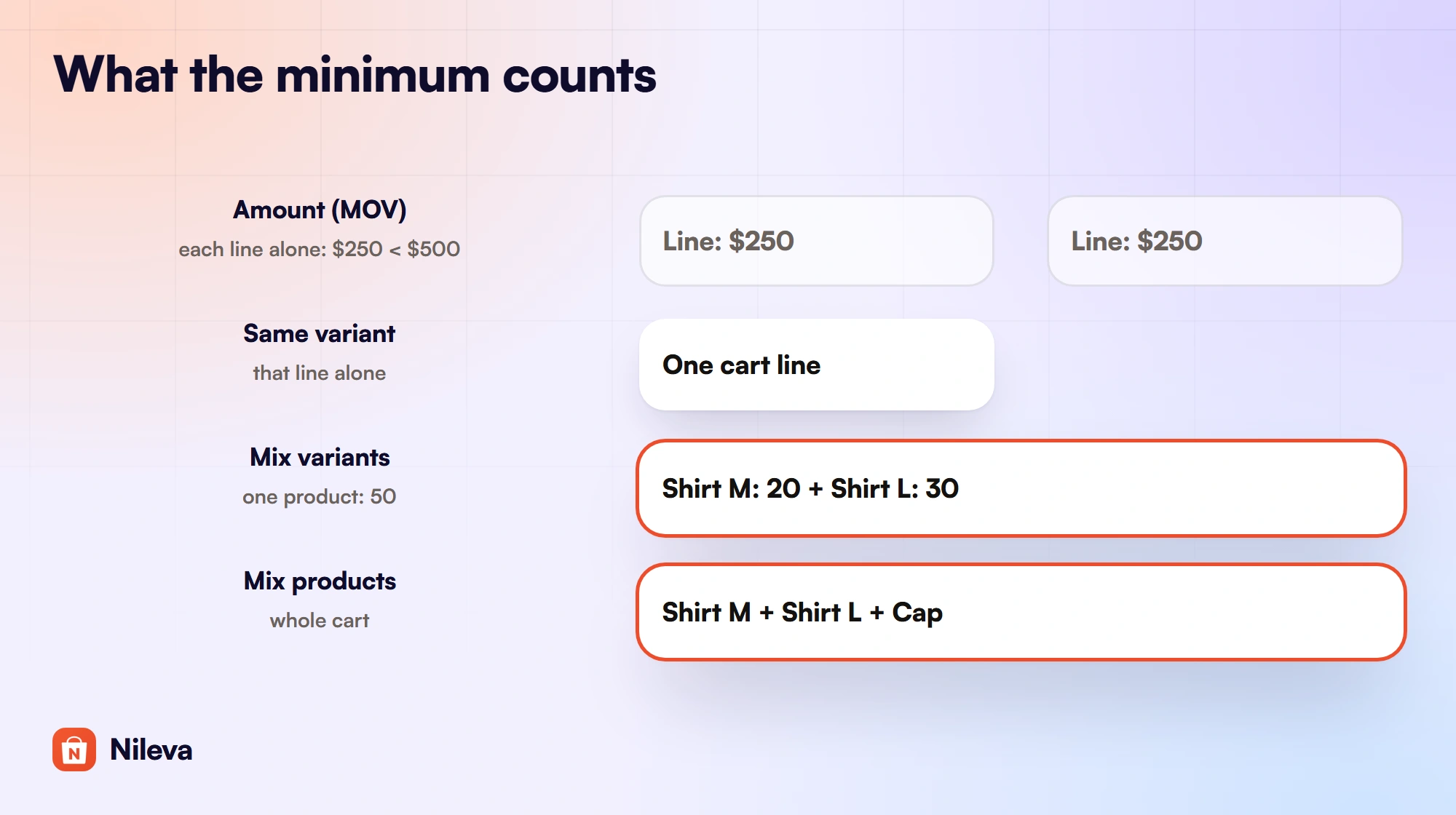
One cart, three counting methods
Example: a store sells a shirt and a cap, and a quantity rule covers both with tier 1 at 50 units and checkout blocked below it. The buyer's cart holds Shirt Black / M × 20, Shirt Black / L × 25 and Cap × 10.
| Discount method | Shirt M counts | Shirt L counts | Cap counts | Lines blocked |
|---|---|---|---|---|
| Same variant | 20 | 25 | 10 | All 3 |
| Mix variants | 20 + 25 = 45 | 20 + 25 = 45 | 10 | All 3 |
| Mix products | 20 + 25 + 10 = 55 | 55 | 55 | None |
Under Mix variants, adding 5 more of size L makes the shirt total 20 + 30 = 50, so both shirt lines clear while the cap line stays blocked at 10. The Mix variants and Mix products methods are on the Advanced plan.
Amount minimums count one line at a time
Example: an amount rule with tier 1 at $500 and the block on, and a product at $25. A line of 20 units is 20 × $25 = $500, so it clears. A second line of 10 units of another $25 product is $250 and is blocked, even though the cart totals $750. Two lines of $250 each total $500 and are both blocked, because neither line reaches $500 alone.
What shoppers see before and at checkout
On the product page, a note sits under the volume pricing table (the Volume Pricing Table app block), so buyers learn the minimum before they fill a cart:
- An amount rule shows
Save 10% — minimum €1,000.00 spend. - A quantity rule shows
Save 10% — minimum 50 units. - When tier 1 is a Fixed price there is no saving to quote, so the note reads
Minimum €800.00 spendorMinimum 50 units.
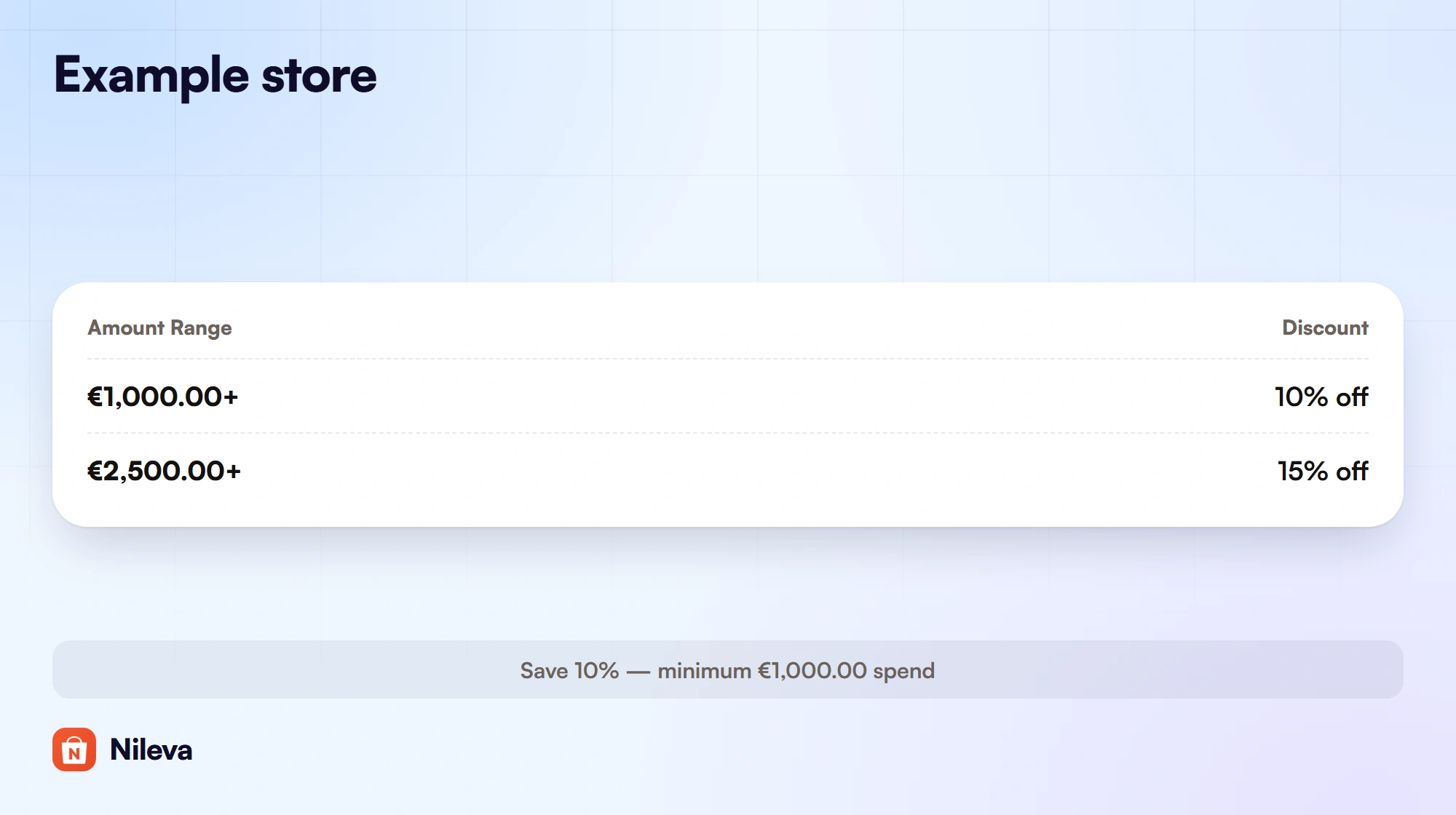
You can reword the amount-rule notes per language in Settings → Storefront Text → Volume Pricing (the Minimum spend note fields), keeping the {discount} and {amount} placeholders. The quantity-rule notes have no field in the admin today, so they keep the app's built-in wording in each language.
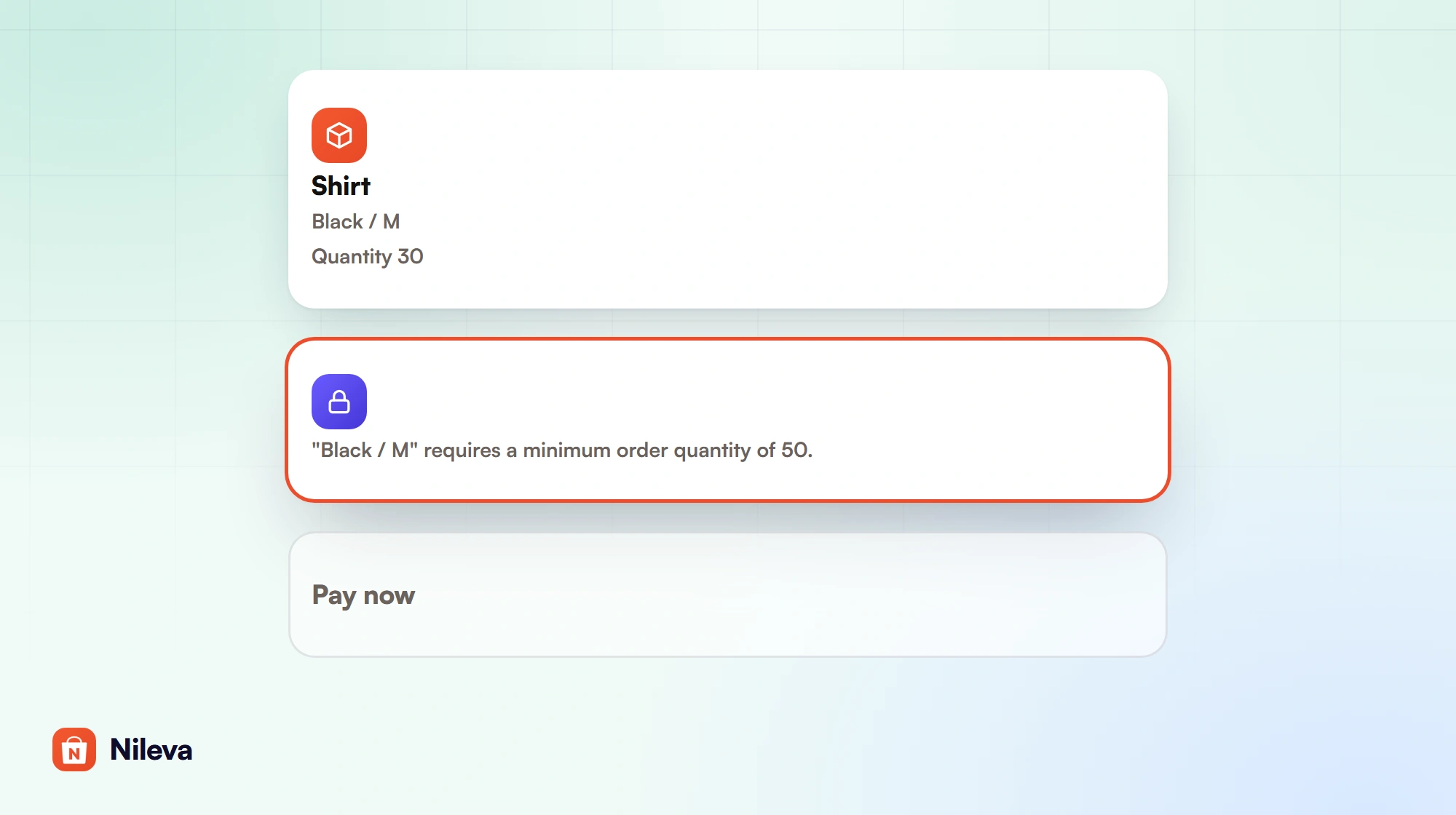
At checkout, a line that is still short gets a message attached to it. The name in quotes is the variant's title as Shopify reports it:
"Black / M" requires a minimum order of 1000.00 EUR."Black / M" requires a minimum order quantity of 50.
Only one volume minimum is reported per line, so a buyer who is short on two volume rules doesn't see a wall of errors. The wholesale rule's minimum is checked separately with the same quantity sentence, so a line short on both kinds gets two messages.
A minimum of 20, discounts from 50
Because the minimum is tier 1, a common request needs a small trick: "buyers must order at least 20, but the discount starts at 50." The docs' answer is to add a 0%-off tier at 20. It shows as a row in the volume table, and the block sits at 20.
| Tier | Quantity | Discount | Example at $12 a unit | Effect |
|---|---|---|---|---|
| 1 | 20–49 | 0% off | 20 units = $240.00; 49 units = $588.00 | Checkout blocked below 20; no discount |
| 2 | 50+ | 10% off | 50 units = $600.00 − $60.00 = $540.00 | Discount from 50 |
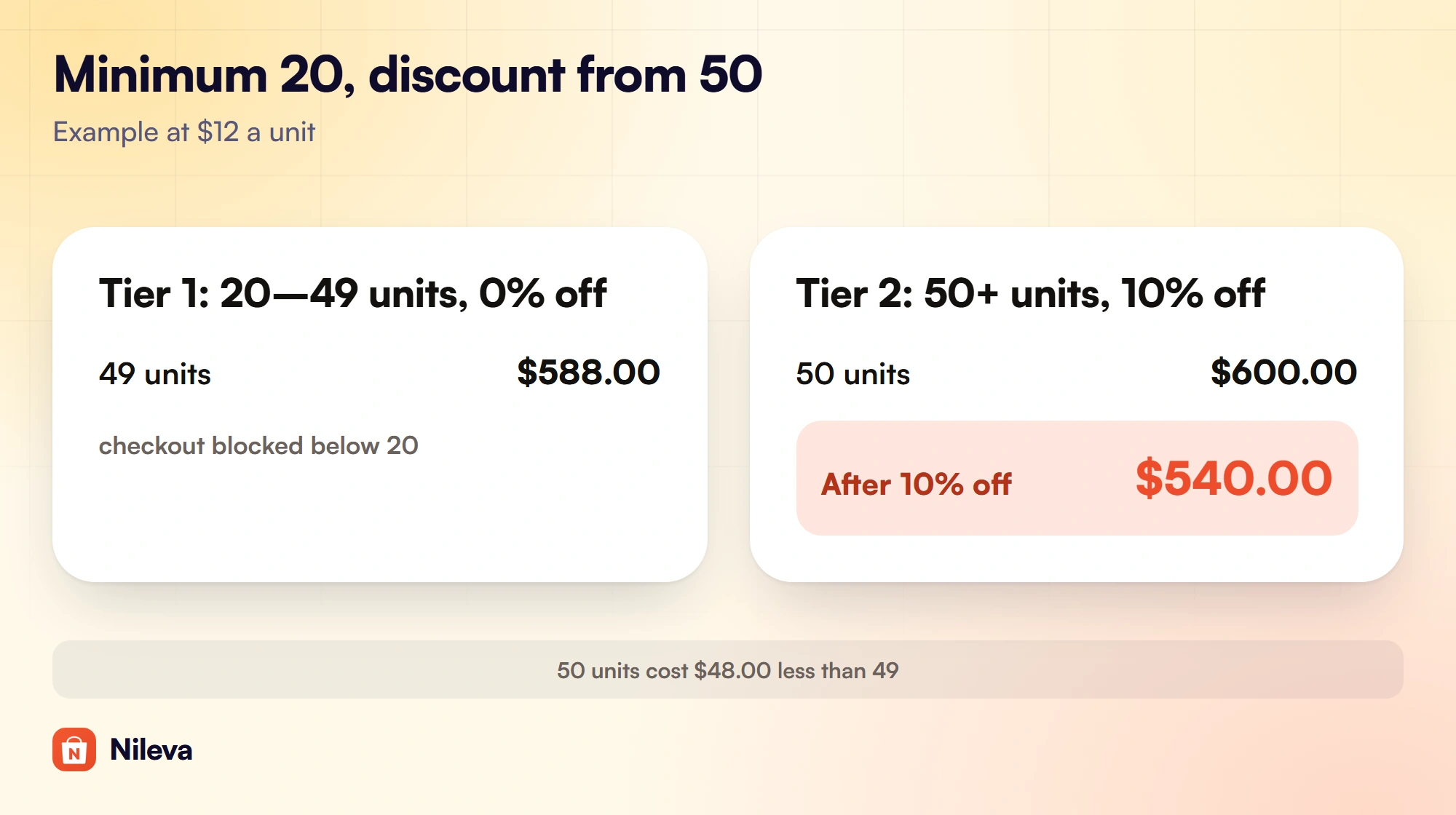
Look at the last two rows before you publish tiers like these. At $12 a unit, 50 units cost $540.00 and 49 units cost $588.00, so the larger order is $48.00 cheaper. The 50-unit price equals 45 units at full price ($540.00 ÷ $12 = 45), so any order of 46 to 49 units costs more than ordering 50. The volume table on the product page lists both tiers, so a buyer can see the saving before checkout; our guide to quantity breaks covers how to space tiers.
One more check: with a 0% first tier, the product page note quotes that tier's saving, so it reads Save 0% — minimum 20 units. The quantity-rule note can't be reworded in the admin today, so decide whether that line is acceptable on your product page before you use this method.
Limits to know before you rely on minimums
These come from the app's documentation and its checkout code, and they decide whether the app fits your rule.
- No cart-wide minimum order value. A "$1,000 across the whole order" minimum isn't available today. Amount minimums count each cart line on its own.
- Mix products counts the whole cart. It adds up every line in the cart, including products the rule doesn't cover. If the rule covers only shirts, a cart of 30 shirts and 25 caps counts 55 units toward the shirts' minimum of 50.
- The drawer and the form check in the drawer and the form. The checkout check covers the wholesale rule's minimum and the volume rule's minimum. Variant Drawer constraints and Quick Order steps are checked when the buyer uses those tools; for a minimum that must hold at checkout, use a volume or wholesale rule.
- The minimum binds only the rule's customers. A rule aimed at a wholesale tag leaves everyone else free to buy any quantity, which is usually what a store selling to both wholesale and retail wants.
- A downgrade stops enforcement, not discounts. Below Advanced, the minimum stays saved but checkout is no longer blocked, and the rule keeps discounting. Upgrade again and it comes back without retyping (Billing & plan).
- It is an Advanced plan feature. Advanced is $30 a month, with a 7-day free trial once per store. On Free and Essential the switch is visible but read-only.
For how tiers, customer groups and the price at checkout fit together, start with the wholesale pricing guide.
Frequently asked questions
Can Shopify set a minimum order quantity?
Yes. Shopify B2B has native quantity rules (minimum, maximum and increment) on the Basic, Grow, Advanced and Plus plans. They apply per variant to buyers at company locations who get the catalog, and buyers can't combine variants to meet them.
Can I set a minimum order value on Shopify?
With the app, an amount volume rule can block checkout until a cart line reaches the rule's first tier, on the Advanced plan. Each line has to reach the amount on its own; a cart-wide minimum across the whole order isn't available today.
Can the minimum apply only to wholesale buyers?
Yes. The rule's customer eligibility decides who it binds, for example customers with a wholesale tag. Shoppers outside the rule can buy any quantity.
Can buyers combine variants to reach the minimum?
Yes, when the quantity rule uses Mix variants (all sizes of one product count together) or Mix products (every line in the cart counts). Same variant counts each line alone.
What happens to minimums if I downgrade?
Checkout is no longer blocked, the minimum stays saved, and the rule keeps giving its discounts. Upgrading to Advanced again restores the block.
Try it
Block under-sized wholesale orders and show the minimum on the product page.


