 Nileva

This guide shows how to calculate wholesale price from what a product really costs you, then follows one example product all the way to the shelf. You get the wholesale price formula, the difference between margin and markup, keystone retail pricing, and the part most calculators skip: what each quantity tier and each stacked discount does to your margin, and how to turn a margin floor into numbers you can type into Shopify.
Key takeaways
- Start from landed cost: what one unit costs you once it is on your shelf, not the factory price alone.
- Wholesale price = cost / (1 − target margin). An $8.00 cost at a 50% margin gives $16.00.
- Margin and markup are different numbers for the same sale: a 100% markup is a 50% margin.
- Every volume tier and every stacked discount comes out of your margin, so compute the margin at your deepest tier before you publish it.
- Read the real margin in Shopify's profit reports, which use net sales after discounts, not on the product page, which shows the retail margin.
What goes into the cost of a wholesale product
The number you divide in the formula is your landed cost: everything you pay to get one sellable unit into your stockroom. If you start from the supplier's unit price alone, every price you build on it is too low by the costs you left out.
Add up, per unit:
- The unit cost you pay the maker or supplier, or your materials and labor if you make the product yourself.
- Inbound freight and any import duties, divided by the number of units in the shipment.
- Packaging that ships with the product: the box, the insert, the label.
- Anything else you pay per unit before the sale, such as a per-unit handling charge from a warehouse.
Payment processing fees are different: they are charged mostly as a percentage of the sale, so they shrink your margin rather than raise your cost. Check your processor's rate and keep it in mind when you choose a target margin.
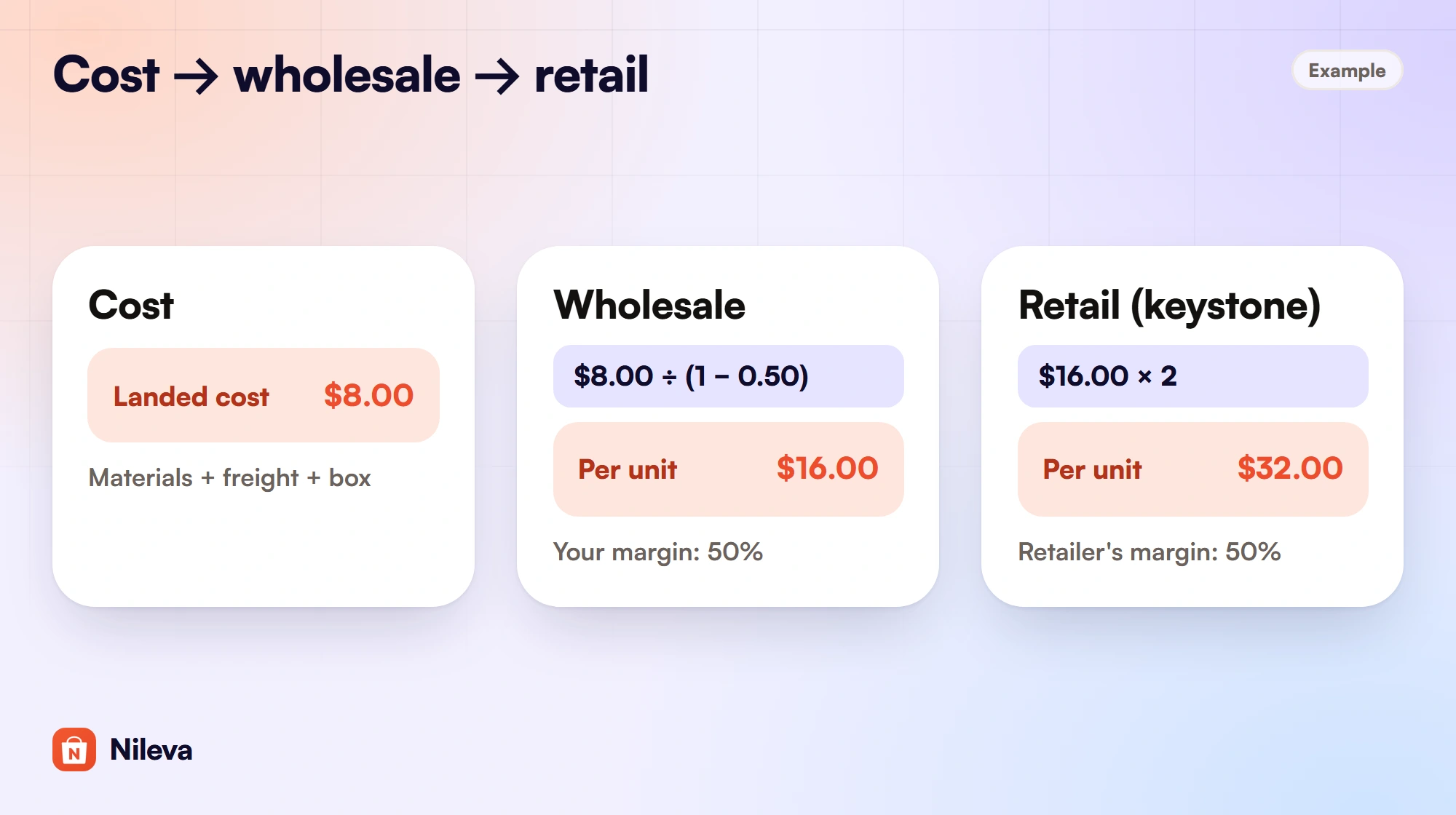
Example: a candle maker pays $6.50 for materials and labor, $0.90 of inbound freight per unit and $0.60 for the box. The landed cost is $6.50 + $0.90 + $0.60 = $8.00. The rest of this article uses that $8.00.
How to calculate wholesale price from cost
Pick the margin you want to keep on every wholesale unit, then divide your cost by what is left of a dollar after that margin:
Wholesale price = landed cost / (1 − target margin)
The 50% in the example below is the example's choice, not a rule or a benchmark. Your margin depends on your costs, your volumes and what your buyers can resell at.
| Step | Computation | Result |
|---|---|---|
| Landed cost (example) | given | $8.00 |
| Wholesale price at a 50% margin | $8.00 / (1 − 0.50) | $16.00 |
| Suggested retail (keystone) | $16.00 × 2 | $32.00 |
| Your markup on cost | ($16.00 − $8.00) / $8.00 | 100% |
| The retailer's margin | ($32.00 − $16.00) / $32.00 | 50% |
Check the result the other way round: at $16.00 you keep $16.00 − $8.00 = $8.00 per unit, and $8.00 is 50% of $16.00. If the check does not return your target margin, the formula was applied to the wrong number.
Margin and markup are not the same number
Markup is profit divided by cost. Margin is profit divided by price. The same sale gives two different percentages, and mixing them up is the most common way to underprice a wholesale line. A seller who wants a 50% margin and "adds 50%" to an $8.00 cost charges $12.00 and keeps only a third of the price.
| Markup on cost | Margin on price | Check: cost $8.00 |
|---|---|---|
| 25% | 20% | price $10.00: ($10 − $8) / $10 = 20% |
| 50% | 33.3% | price $12.00: ($12 − $8) / $12 = 33.3% |
| 100% | 50% | price $16.00: ($16 − $8) / $16 = 50% |
To convert, margin = markup / (1 + markup), and markup = margin / (1 − margin). A 100% markup is 1 / 2 = 50% margin; a 50% margin is 0.5 / 0.5 = 100% markup. Shopify uses margin, not markup, on the product page and in its profit reports, so set your targets as margins.
Keystone: the retail price from the wholesale price
Keystone pricing is a common convention in which the retail price is twice the wholesale price. It is not a rule every retailer follows, but it is a quick way to suggest a shelf price on your line sheet. At $16.00 wholesale, keystone retail is $16.00 × 2 = $32.00, and the retailer keeps ($32.00 − $16.00) / $32.00 = 50%.
If you also sell to consumers in your own store, your retail price is the number your wholesale buyers compare against. Selling direct at less than the suggested retail you give stockists undercuts them, so most brands that do both keep the two prices consistent.
A wholesale pricing strategy for distributors and retailers
A distributor adds a level between you and the shop, and that level needs a margin too. The shelf price usually stays where it was, so the distributor's margin comes out of yours.
| Seller | Buys at | Sells at | Margin |
|---|---|---|---|
| Brand | cost $8.00 | $12.00 to the distributor | ($12 − $8) / $12 = 33.3% |
| Distributor | $12.00 | $16.00 to the retailer | ($16 − $12) / $16 = 25% |
| Retailer | $16.00 | $32.00 to the shopper | ($32 − $16) / $32 = 50% |
In this example the brand's profit per unit falls from $8.00 (selling to the retailer at $16.00) to $4.00 (selling to the distributor at $12.00). The distributor price is $16.00 × 0.75 = $12.00, a 25% discount off your wholesale price. That only works if the distributor moves enough extra volume to make up for half the profit per unit, so calculate the distributor price separately and give it its own rule rather than reusing your best retailer tier.
What quantity breaks do to your margin
Quantity breaks reward bigger orders with a lower unit price. They are worth offering, but a tier that looks small on the price takes a large share of your profit, because the discount comes off the price while your cost stays the same.
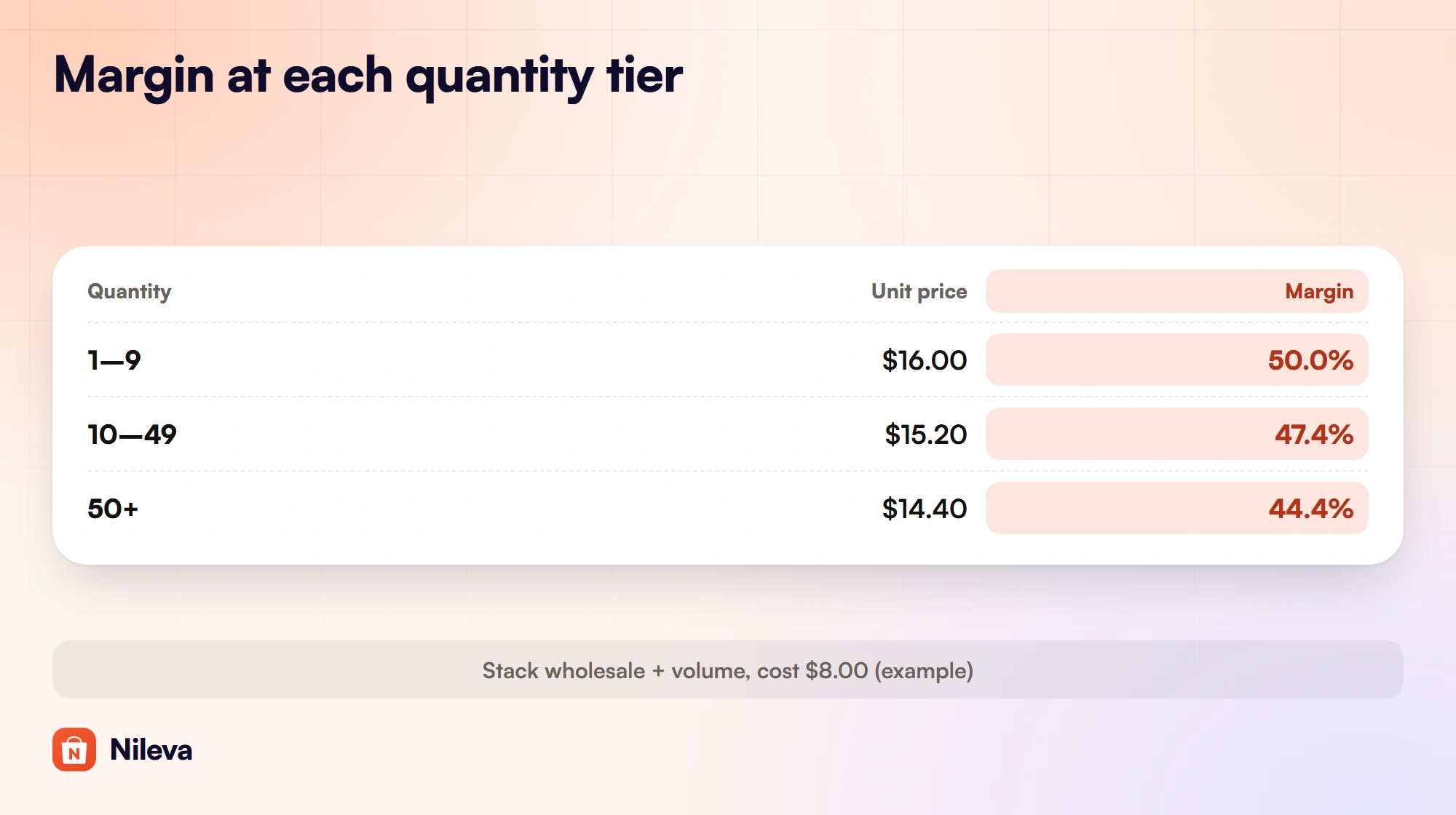
Example: the candle retails at $32.00. Wholesale buyers get 50% off, so they pay $16.00. A volume rule for the same buyers adds 5% off at 10 to 49 units and 10% off at 50 units and more, and the store's discount setting is set to stack the two (explained below).
| Quantity | Volume tier | Unit price | Margin |
|---|---|---|---|
| 1–9 | none | $32.00 × 0.50 = $16.00 | 50.0% |
| 10–49 | 5% off | $32.00 × 0.50 × 0.95 = $15.20 | ($15.20 − $8) / $15.20 = 47.4% |
| 50+ | 10% off | $32.00 × 0.50 × 0.90 = $14.40 | ($14.40 − $8) / $14.40 = 44.4% |
| any, with Best price for customer | the tiers give $30.40 or $28.80, the wholesale rule $16.00 | $16.00 (the tier is skipped) | 50.0% |
Look at profit per unit rather than the percentages. At $16.00 you keep $8.00; at $14.40 you keep $6.40. A 10% cut in price removed 20% of your profit per unit, because at a 50% margin half of every price dollar was profit to begin with. To earn the same total profit at the 50+ tier, a buyer has to order $8.00 / $6.40 = 1.25 times as many units as they would have at $16.00.
Best price or stacked: the trap in tier design
When a buyer qualifies for both a wholesale price and a volume tier, something has to decide what they pay. In Nileva B2B Wholesale Pricing that is one store-wide setting under Settings → General, headed Discount combination (the documentation calls it the discount strategy, with the short names Best price and Stack):
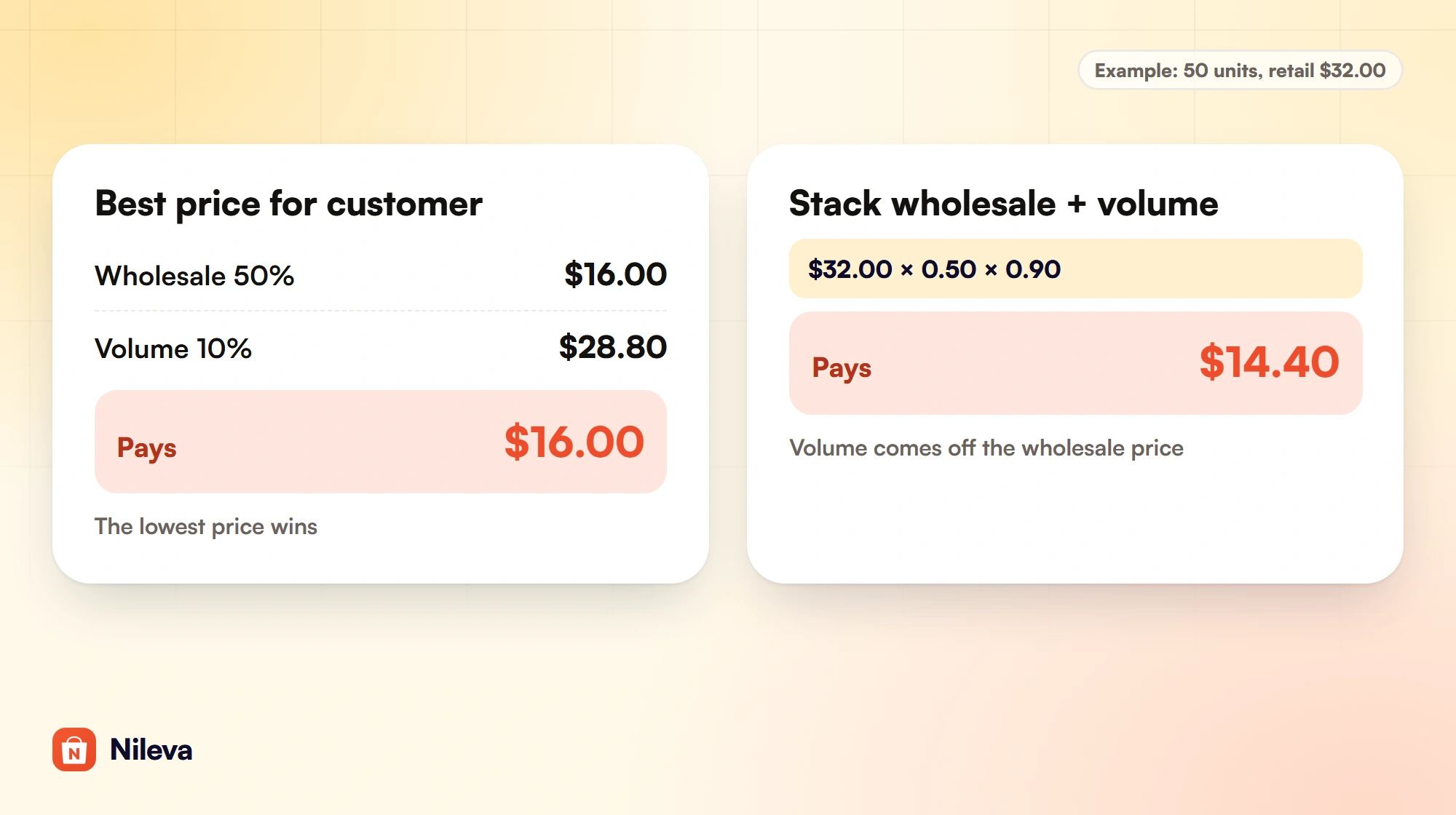
- Best price for customer (the default): "Apply the single rule that results in the lowest price. Other matching rules are skipped."
- Stack wholesale + volume: "Apply wholesale discount first, then volume discount on top of the reduced price."
The app applies the same choice at checkout (discount strategy).
The trap is in Best price. Under it, each rule's price is worked out from the product's own price and the lower one wins. A 10% tier on $32.00 gives $28.80, which never beats the $16.00 wholesale price, so a wholesale buyer never sees your tiers at all: the bottom row of the table above. Tiers set as a percentage off retail only reach a wholesale buyer under Best price when they go deeper than the wholesale discount.
You can reach the stacked prices under Best price too. Give the wholesale buyers' volume rule fixed-price tiers (the tier's Fixed Price type) of $15.20 at 10 units and $14.40 at 50 units (52.5% and 55% below $32.00), and those tiers beat the $16.00 wholesale price. Under Stack, the 5% and 10% tiers come off the reduced price and give the same $15.20 and $14.40, and margin falls exactly as in the table. Either way, compute the margin of the deepest tier before you publish it. How tiers count units (per variant, across variants or across products) is set per rule, the last two on the Advanced plan; see quantity tiers.
Set a margin floor and use it
A margin floor is the lowest margin you will accept on any wholesale sale, whatever the quantity or the negotiation. Turn it into a floor price once, with the same formula, then use that price everywhere a lower price could slip in.
| What | Computation | Result |
|---|---|---|
| Floor price at a 40% margin (example) | $8.00 / (1 − 0.40) = $13.333, rounded up | $13.34 |
| Quote floor, measured from the $32.00 product price | (1 − 13.34 / 32) × 100 = 58.3%, use 58% | requests below $32 × 0.42 = $13.44 are rejected |
| Deepest stacked tier allowed | $13.34 / $16.00 = 0.834 | a tier of at most 16% off the wholesale price |
Round the floor price up, never down: at $13.33 the margin is $5.33 / $13.33 = 39.98%, just under the floor; at $13.34 it is $5.34 / $13.34 = 40.03%. The floor price then sets three numbers:
- The deepest tier. Under Stack, 16% off $16.00 gives $13.44, above the floor; 17% gives $13.28, below it. Under Best price, where tiers come off the $32.00 retail price, the deepest tier is 58% off ($32.00 × 0.42 = $13.44).
- A fixed price in a rule. Never type a fixed wholesale or tier price below $13.34.
- The quote floor. See below.
The quote floor is measured from the product's own price
If you take quote requests, buyers can propose a target price per item. On the Advanced plan the app can reject low requests automatically: in the quote settings, turn on Reject if target price below floor and set Floor percentage below catalog. A request is rejected when an item's target price is more than that percentage below the listed price, and the buyer sees "Your target price is too low — it can't be more than {floor}% below the listed price." The docs' example: catalog $25, floor 30%, so any request below $17.50 is rejected (enable quotes).
The listed price is the variant's own price in Shopify, the $32.00 in the Price field, not the buyer's wholesale price. The app reads it from Shopify when the request arrives, so the floor is a percentage of retail even for a buyer who sees $16.00 on the page. That is why the table divides by $32.00. Round the percentage down: a lower floor rejects more. Rounding up lets losing offers in. A 59% floor on $32.00 lets in $32.00 × 0.41 = $13.12, a 39.0% margin.
The mistake to avoid is working the floor out from the wholesale price. That gives (1 − 13.34 / 16) × 100 = 16.6%, so 16%, and the app applies those 16% to $32.00: it rejects anything under $32.00 × 0.84 = $26.88, including offers that are good business. A buyer asking $20.00 for the candle, 37.5% below $32.00, would be turned away although $20.00 is above your wholesale price.
Requests without a target price are not checked, and a floor never stops you from replying with a lower price yourself, so your floor price belongs next to the reply screen too. Our guide to quotes on Shopify covers the rest of the quote flow.
Enter the price in Shopify
Put the retail price, $32.00, in the product's Price field and the landed cost, $8.00, in Cost per item in the same section. Shopify then shows the projected profit and margin on the product page (Shopify Help Center: cost per item).
The wholesale price goes into a rule, so retail shoppers keep seeing $32.00. In the app, a wholesale pricing rule's Discount type is Percent, Amount or Fixed amount (the documentation calls them Percent off, Amount off and Fixed price). For the example, either Percent 50 or Fixed amount 16.00 on this product gives $16.00 today. They behave differently later: raise the retail price to $36.00 and Percent gives $36.00 × 0.50 = $18.00, while Fixed amount stays at $16.00. If your variants have different costs, the Advanced plan lets a rule set a different discount per variant. Our wholesale pricing guide walks through creating the rule, and a price per customer tier shows how to give each group its own level. A rule for a customer tag or group needs the Essential plan or higher.
Shopify's own B2B catalogs are the native alternative: they set percentage adjustments or fixed prices for company buyers (Shopify Help Center: B2B catalogs). Whichever you use, the margin arithmetic above does not change. Once you know how to calculate wholesale price from your cost, entering it in either place is the easy part.
Check the real margin after the sale
The margin on the product page is the retail margin: ($32.00 − $8.00) / $32.00 = 75%. A wholesale buyer never pays $32.00, so that number tells you nothing about your trade business.
Shopify's profit reports use net sales, after discounts, and compute the margin as (net sales − cost) / net sales. Shopify's own example is a T-shirt whose 50% margin shows as 33% in the report once it is sold at a discount. Profit is reported only for products that had a cost recorded when they were sold, so enter Cost per item before your first wholesale order (Shopify Help Center: profit reports).
Example: one order of 50 candles at the stacked $14.40. Net sales are 50 × $14.40 = $720.00, cost is 50 × $8.00 = $400.00, gross profit is $320.00, and the margin is $320.00 / $720.00 = 44.4%, the same as the 50+ row of the tier table. A $16.00 sale shows 50%.
The app does not store costs or calculate margins; Shopify's Cost per item and profit reports do that. What it adds is the cost side of your pricing: under Orders → Analytics, on every plan including Free, the table What your B2B pricing cost you lists, by customer group, Orders, Gross sales, Discounts, Returns and Net sales for the orders the app's pricing applied to (Analytics overview). The wholesale price is charged as a discount on each line at checkout, and Shopify counts gross sales as product price × quantity before discounts (Shopify Help Center: sales report). So for the example order, with nothing returned, the row would read Gross sales 50 × $32.00 = $1,600.00, Discounts $1,600.00 − $720.00 = $880.00 and Net sales $720.00. Put the net sales next to your cost to see whether each group stays above your floor. Our guide to Shopify B2B reports shows where to read wholesale sales in Shopify and in the app.
Frequently asked questions
What is the formula for wholesale price?
Wholesale price = landed cost / (1 − target margin). At an $8.00 cost and a 50% margin it is $8.00 / 0.50 = $16.00.
What is the difference between margin and markup?
Markup is profit divided by cost; margin is profit divided by price. A 100% markup is a 50% margin, and a 50% markup is only a 33.3% margin.
What is keystone pricing?
A common convention in which the retail price is twice the wholesale price, which leaves the retailer a 50% margin. A $16.00 wholesale price suggests $32.00 retail.
What margin should a wholesale price have?
There is no single right number, and we do not quote benchmarks. Work it out from your landed cost, the volumes you expect and the shelf price your buyers can sell at, then set a floor and check that your deepest tier stays above it.
Do volume discounts stack with wholesale prices on Shopify?
With the app you choose. "Best price for customer" applies only the single rule with the lowest price; "Stack wholesale + volume" takes the volume tier off the wholesale price. Stacking 10% on a $16.00 wholesale price gives $14.40.
Where do I see my real wholesale margin in Shopify?
In Shopify's profit reports, which use net sales after discounts for products that have a cost per item. The product page shows the retail margin, 75% in this article's example, not what a wholesale sale earns.
Try it
Turn your wholesale price list into rules that show and charge the right price, free to start.


