 Nileva

Shopify B2B company accounts let you treat a business, not a single person, as your customer: several buyers from the same firm sign in on their own and all get the same trade prices. This guide shows the two ways to build that on Shopify, Shopify's native companies with locations and contacts, and the company records of a wholesale app. It covers what each one holds, what happens to a buyer's price when you add, remove or pause them, and where to see a company's orders afterwards.
Key takeaways
- Shopify's native companies, company locations and location permissions are part of B2B on Basic, Grow, Advanced and Plus.
- In Shopify's model the company location holds the terms: catalogs, payment terms, tax settings and checkout settings.
- An app's companies can be simpler: in B2B Wholesale Pricing a company is the app's own record, needs neither Plus nor Shopify's native B2B, and passes one price tier to every contact.
- An invite link per company lets a business's staff register straight into it, so you don't add each buyer by hand.
- Check reporting before you choose: Shopify's reports group sales by native company, while the app tags each company's orders and keeps its own order count and total spend per company.
What a company account is and when you need one
Shopify B2B company accounts group the people who buy for one business. The business is the account holder; the buyers are its contacts. The point is to set prices, terms and approval once for the business instead of for each person who signs in.
You need one as soon as a customer is a team rather than a person. A café group where a manager and two chefs each reorder, or a distributor with a buyer in each branch, is a typical case. With single-person accounts every new buyer is a new setup task, and the day you change that business's price level you have to remember every account that belongs to it.
Shopify's native companies, locations and contacts
Shopify B2B is built on three records (Shopify Help Center: companies and customers):
- The company is the parent organization. In Shopify's words, "You must set up your B2B customers as companies to use Shopify B2B."
- The company location is the specific business or branch you sell to. A new company gets one location automatically, and you can create more.
- The customer is the person who buys on behalf of the business.
Locations hold the terms
Most of what decides how a business buys sits on the location, not on the company. Each location has its own shipping and billing addresses, tax ID and tax settings, catalogs, payment terms and checkout settings, including whether orders are submitted as drafts for your review (Shopify Help Center: creating companies).
Payment terms (net 7 to net 90, or due on fulfillment) are set per location, and deposit requirements are Plus only (Shopify Help Center: payment terms). Catalogs, which set the products and prices a business sees, are assigned to B2B markets. Assigning a catalog directly to a company location needs Plus, and below Plus you can have up to 3 active catalog assignments (Shopify Help Center: catalogs).
Contacts and their permissions
A customer is added to a company and given permissions per location. There are two (Shopify Help Center: adding customers):
- Ordering only: places orders for the assigned locations and sees their own order history.
- Location admin: places orders, sees the orders every customer has placed for that location, and can edit its billing and shipping addresses.
A customer can belong to only one company but to several of its locations, and B2B customers need customer accounts, not legacy accounts. Shopify allows up to 10,000 customers per company and 50 per location (creating companies).
Which Shopify plans include them
Companies, company locations, location-level permissions and net payment terms are available on Basic, Grow, Advanced and Plus (Shopify Help Center: B2B features by plan). Among the Plus-only parts are direct company catalogs, deposits, partial payments and payment requests per fulfillment. For the full plan-by-plan picture, read our guide to B2B without Plus.
Shopify B2B company accounts in the app
Nileva B2B Wholesale Pricing has its own Companies, under Customers → Companies in the app. They are records in the app, not Shopify B2B companies: they need neither Plus nor Shopify's native B2B features, and the app doesn't create Shopify companies or link its records to them (Companies overview).
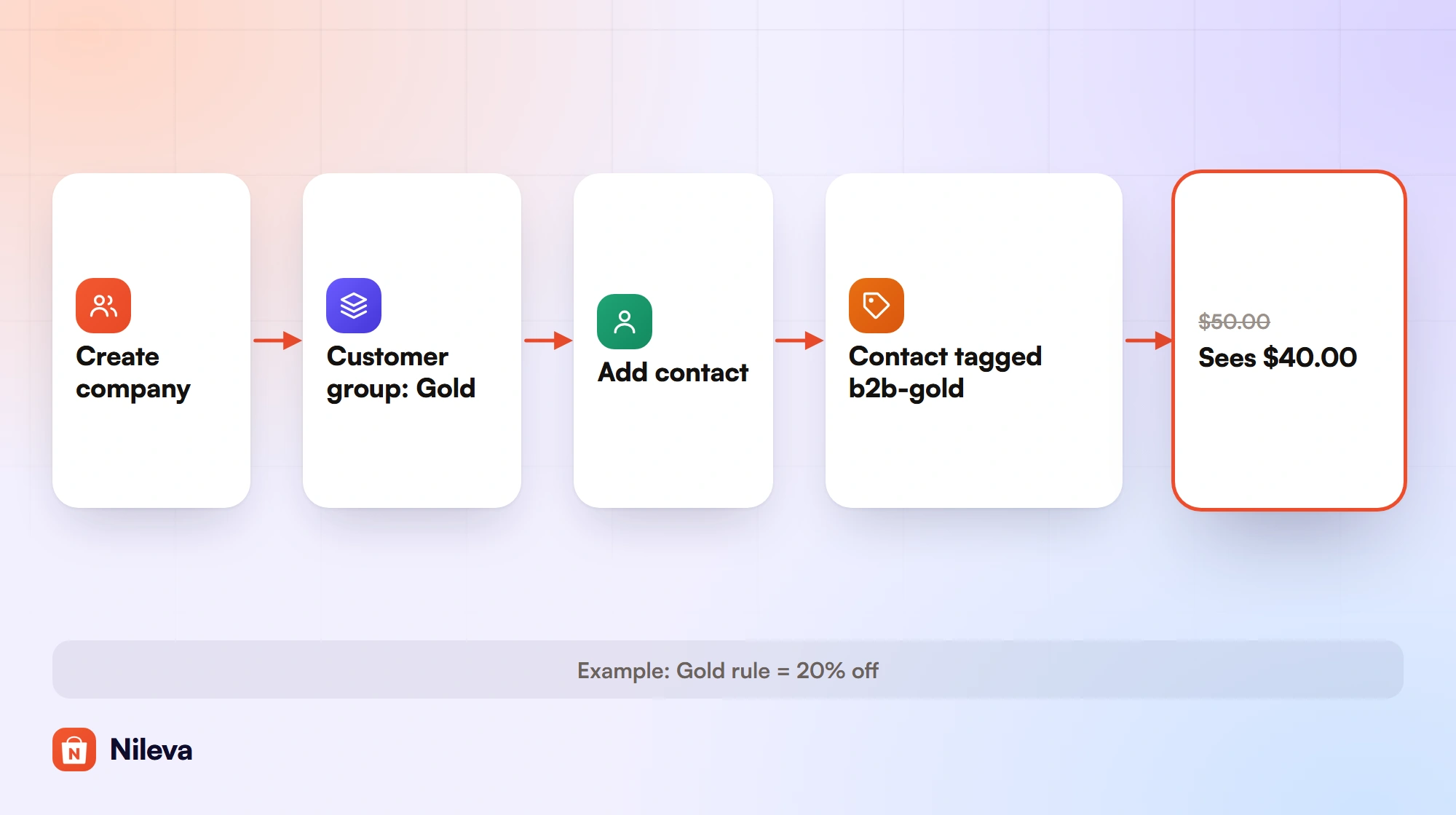
The idea is narrow on purpose. A company groups its contacts, and the Customer Group (price tier) you assign to the company reaches every contact as a Shopify customer tag. Your wholesale pricing rules already price by that tag, so nothing else changes.
Companies aren't part of the Free plan. Advanced includes 50 companies and Platinum an unlimited number.
Create a company and assign a tier
Click Create company. The editor asks for the Company name, Email and Phone (all required), an internal Note, a Status, a Customer group and one address. On save the app creates the company and a unique registration link for it, and emails that link to the company's email address so the business can pass it on to its staff.
In the Customer group tab you pick the tier. Every contact gets the group's tag shortly after you save, and contacts you add later get it too. Choose No group assigned if you would rather set tiers per contact. The price itself comes from a wholesale pricing rule that targets the group; group targeting starts on the Essential plan, and our customer-specific pricing guide shows how to set one up.
Example (a made-up shop): your Gold group's rule gives 20% off. Example Distributors is assigned Gold and has three contacts. A product that retails at $50.00 costs each of them $40.00 ($50.00 × 0.80), and a 10-unit order costs $400.00 instead of $500.00. Move the company to a 10% group and all three see $45.00 ($50.00 × 0.90) the next time they shop, without you touching their accounts.
Invite the company's buyers
There are two ways to add contacts (invite contacts):
- Add them yourself. In the Contacts tab, click Add contact and pick existing Shopify customers. Someone who isn't a Shopify customer yet has to register first, or you create the customer in Shopify and then add them.
- Send the invite link. The Registration tab shows the company's link (
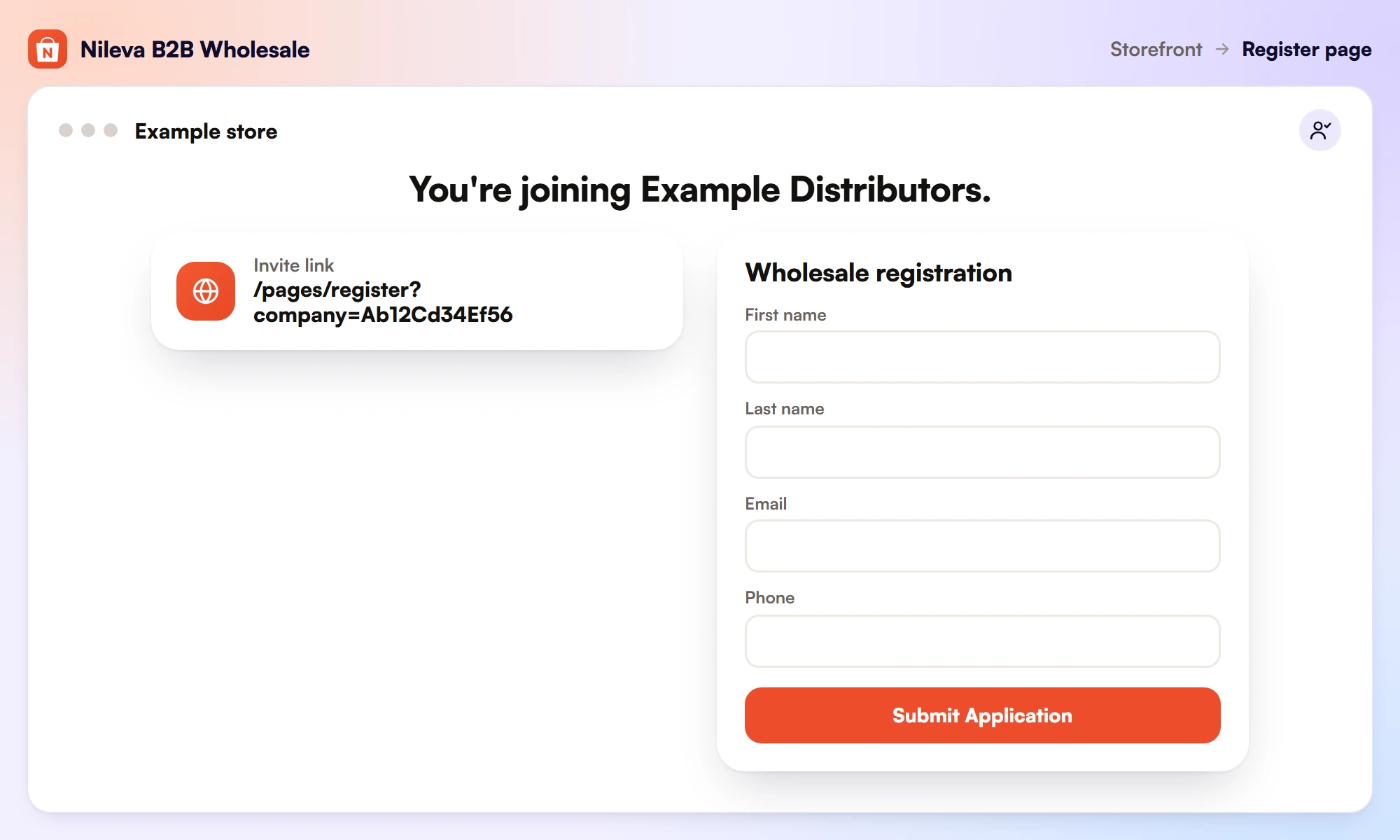
/pages/register?company=<slug>) with Copy, Reset link and Invite contact. Reset gives the company a new link and the old one stops working at once. Invite contact emails the link to one or more addresses, or to the company's own email if you leave the box empty.
The invite link opens your registration form in Join company mode. The buyer sees "You're joining" and the company's name, can't switch to another mode, and fills in personal details only, because the company's tax ID and address are already on file. When you approve the application, the company's group is pre-selected, so the new contact gets the same tier as the rest of the company unless you pick another. If a business registers itself with the "A company" option, approval creates the company in the app with that buyer as its first contact (if your plan's company limit allows), and their approval email carries the company's invite link to pass on. Our guide to the wholesale registration form covers the form and its three modes.
A customer can be a contact of one company at a time. If you try to add someone who already belongs to another company, the app refuses and names that company, so you remove them there first.
Active, inactive and deleted companies
A company's Status is a switch for its wholesale benefit (company status). Set it to Inactive to pause an account, for a late payment or an off season: the contacts and address stay on file, but the tier tag comes off and the contacts see retail prices. Set it back to Active and the tag returns.
This table shows what each change does to a contact's tag, and so to their price.
| What you do | The contact's group tag | The price they see |
|---|---|---|
| Add a contact to an active company with a group | Added | The group's price |
| Remove a contact | Removed | Retail, unless another rule applies to them |
| Switch the company to another group | Old tag off, new tag on | The new group's price |
| Set the company to Inactive | Removed; the contact stays on file | Retail |
| Set it back to Active | Added again | The group's price |
| Delete the company | Removed from every contact | Retail |
Native companies or app companies: what lives where
The two models put the same business details in different places. This table is a map, not a ranking; both columns come from the pages linked above.
| What | Shopify native B2B | B2B Wholesale Pricing companies |
|---|---|---|
| Structure | Company, its locations, and customers per location | Company and its contacts |
| Addresses | Shipping and billing per location | One address per company |
| Prices | Catalogs assigned to B2B markets; direct to a location on Plus | The company's Customer Group tag, priced by your rules |
| Payment terms | Per location | A default per Customer Group for Draft Orders, not per company |
| Tax exemption | Tax ID and settings per location | Per customer or per Customer Group, on Platinum |
| Self-registration | Company account requests (Shopify Forms) | Registration form and a per-company invite link |
Customer group alone, or company and group?
Not every wholesale buyer needs a company. The app's docs give this rule of thumb (Companies overview):
| Situation | Use |
|---|---|
| A single solo wholesale buyer | Customer Group only |
| A business with one buyer, no team | Customer Group only |
| A business with several buyers sharing one price | Company + Customer Group |
| Buyers who self-register and link to a known company | Company + invite link |
The company adds three things on top of the group. You set the tier once for all contacts, new buyers join through the link, and the Companies list shows one row per business instead of one per buyer.
One list of every B2B customer
Companies, groups and approved applications all feed one list: Customers → B2B Registration → All customers (All customers). Each customer appears once, with their tier, their company (or "Direct"), and whether they registered through the form or you added them by hand.
Individual buyers and Company contacts split solo accounts from company buyers. The tier dropdown includes No tier yet, which lists customers without any group, usually new approvals you haven't assigned yet and the first thing to clean up after a busy week of applications.
Orders and reporting by company
The app marks a company contact's orders when they are created. A contact's order is tagged nileva-b2b even if the contact carries no group tag, and it also gets nileva-company-<id>, where the id is the app's id for the company. To list one company's orders in Shopify, open any order from that company, copy its nileva-company-… tag and filter Orders by it. The company's page shows a Company orders card with Orders, Total spend and Last order. It counts the order totals of orders placed while the buyer was a contact, and takes a cancelled order back out. Example: three contacts place orders of $400.00, $250.00 and $350.00, so the card reads 3 orders and 1,000 in total spend. Cancel the $250.00 order and it reads 2 orders and 750.
In Orders → Analytics, available on every plan, the Customer groups view reports a company's sales under its group's name while the contacts carry the group's tag (Analytics overview). A Companies view appears once you've created a company in the app, but it groups orders by the company recorded on the order in Shopify, which is Shopify's native B2B company (ShopifyQL sales schema). An order with no Shopify company shows as Unknown there, so for the app's own companies, use the Customer groups view and the Company orders card.
The company also follows the buyer into other parts of the app. A quote's customer card links to the buyer's company, and the B2B Customer Portal's Profile page shows the buyer their company and pricing tier.
What the app's companies don't do
As of the current docs, the app's companies:
- Don't create or sync with Shopify B2B companies. If you also use native B2B, the two sets of records are separate.
- Have no locations. Each company has one address.
- Don't carry their own catalog or payment terms. Prices come from the group's tag and your rules; the default payment term for Draft Orders sits on the Customer Group (net 30 payment terms explains that flow).
- Don't make contacts tax exempt. Exemptions are set per customer or per Customer Group, on the Platinum plan. Adding someone as a contact of a company whose group is exempt doesn't exempt them; only members you add on the Customer Group page are picked up (automate exemptions). See tax-exempt customers for the full setup.
- Hold one tier per company. An active company passes a single group to its contacts; there is no tier per branch or per collection.
If your buyers need a different price per branch, or terms that differ by location, Shopify's native locations are built for that. If you need one price level shared by a team of buyers, on any Shopify plan, the app's companies are the shorter path. Our wholesale pricing guide shows how the tiers themselves are priced.
Frequently asked questions
Does Shopify support company accounts without Plus?
Yes. Companies, company locations, location permissions and net payment terms are part of Shopify B2B on Basic, Grow, Advanced and Plus. Direct company catalogs and deposits need Plus.
Do the app's companies use Shopify's native B2B?
No. They are the app's own records and work without Plus or Shopify's B2B features. The app doesn't create Shopify companies or sync its own with them.
How do I add a company's staff?
Add existing Shopify customers in the company's Contacts tab, or send the company's invite link so staff register into it. When you approve them, the company's tier is pre-selected for them.
What happens when I deactivate a company?
Its contacts stay on file, but the tier tag is removed and they see retail prices. Setting the company back to Active adds the tag again.
Can one buyer belong to two companies?
Not in either model. Shopify allows a customer in one company, though in several of its locations, and the app allows a contact in one company at a time.
Try it
Give every buyer at a company the same wholesale tier in one step.


